
On Both of the Lines: IM 8.4.11 Lesson
Loading the math board and drawing, please wait…
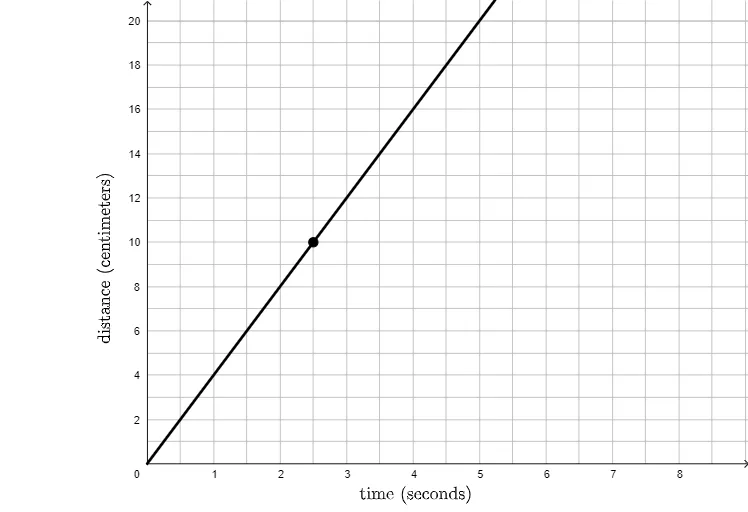
This GeoGebra example demonstrates the geometric concept of a point lying on both of two lines, using ray constructions and text labels to highlight the intersection. It illustrates how two lines (or rays) intersect at a single point, and how that point satisfies the equations of both lines simultaneously. The core mathematical concepts include coordinate geometry, linear equations, and the intersection of lines. The construction uses the Ray command to create two rays, defines object A as the intersection or reference point, and employs text objects (text1, text2) to display coordinates or explanatory notes. This resource is suitable for middle school or early high school students learning introductory analytic geometry. It helps learners visualize the uniqueness of the intersection point and verify point-line relationships algebraically. By dragging the rays, students can observe how the intersection changes, reinforcing their understanding of line families and coordinate representation.
GeoGebra Commands & Parameters
Ray((0, 0), A) → f
AI Drawing Prompt Reference
Draw a coordinate plane with a ray starting from the origin and extending to a draggable point on it. Add text labels near the ray showing the point's coordinates and a note that this point lies on both lines. Use a dashed or auxiliary line passing through the same point to emphasize the intersection of two lines. Keep the layout clear for observing the relationship between the intersection and coordinates.
The prompt above was compiled from the original drawing commands and is for reference only.