
Number Line for Adding and Subtracting
Loading the math board and drawing, please wait…
In collections
Order of Operations
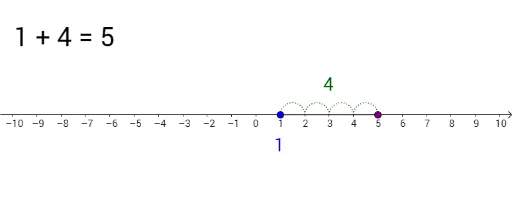
This GeoGebra example demonstrates integer addition and subtraction on a number line, using dynamic points moving along a segment to visualize numerical changes. The core mathematical concepts include the number line, operations with signed numbers, midpoints, and sequences. The construction employs commands such as Point, Segment, Sequence, and Midpoint to create points A and B, segment f, and equally spaced points L_1 and L_2, along with text objects tekst1 through tekst5 to display steps and results. It is suitable for upper elementary to middle school students to grasp the geometric meaning of positive and negative number operations, and serves as an interactive tool for classroom teaching or self-study, fostering visual and intuitive understanding of arithmetic.
GeoGebra Commands & Parameters
Point(xAxis) → APoint(xAxis) → BSegment(A, B) → fSequence(Semicircle[(x(A) + i - 1, 0), (x(A) + i, 0)], i, 1, x(B) - x(A), 1) → L_1Sequence(Semicircle[(x(B) + i, 0), (x(B) + i + 1, 0)], i, 0, x(A) - x(B) - 1, 1) → L_2Midpoint(B, A) → C
AI Drawing Prompt Reference
Draw a horizontal number line with a segment between two movable points at its ends, representing the starting and ending integers. Along the segment, place a series of evenly spaced semicircular marks extending from the left point to the right point, and another series from the right point back to the left point, creating symmetric tick-like decorations. Mark the midpoint of the two endpoints on the line. The diagram illustrates integer addition and subtraction, with the points and semicircle sequences visually showing numerical changes, accompanied by text labels for steps and results.
The prompt above was compiled from the original drawing commands and is for reference only.