
Number Dots and Place Value
Loading the math board and drawing, please wait…
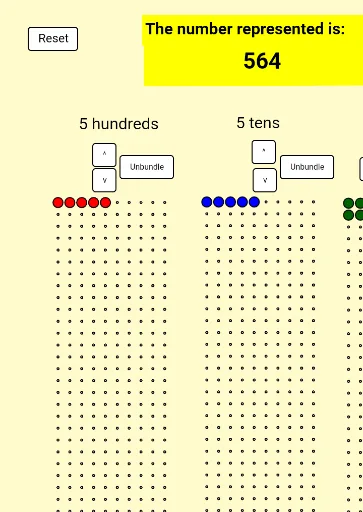
This example demonstrates the concept of place value through the representation of numbers using dots. Key mathematical concepts include place value and decimal notation. Construction highlights the use of Sequence and Mod commands to generate and distribute dots, and Textfield to display the number. Suitable for upper elementary or lower middle school students to learn about place value.
GeoGebra Commands & Parameters
Flatten(Sequence[Sequence[(x(A) + (horizontalspacing * (i - 1)), y(A) - (verticalspacing * (j - 1))), i, 1, numberofcolumns], j, 1, numberofrows]) → arrayonesFlatten(Sequence[Sequence[(x(B) + (horizontalspacing * (i - 1)), y(B) - (verticalspacing * (j - 1))), i, 1, numberofcolumns], j, 1, numberofrows]) → arraytensFlatten(Sequence[Sequence[(x(C) + (horizontalspacing * (i - 1)), y(C) - (verticalspacing * (j - 1))), i, 1, numberofcolumns], j, 1, numberofrows]) → arrayhundredsSequence(Element[arrayones, i], i, 1, displayones) → dotsonesSequence(Element[arraytens, i], i, 1, displaytens) → dotstensSequence(Element[arrayhundreds, i], i, 1, displayhundreds) → dotshundredsMod(inputnumber, 10) → inputonesTextfield(inputtext) → enteranumberPolygon(D, E, F, G) → poly1, d, e, f, g
AI Drawing Prompt Reference
Create a number dot array to illustrate the concept of decimal notation. Start by generating dot arrays for the ones, tens, and hundreds based on the input number. The ones array is determined by the remainder of the input number divided by 10, while the tens and hundreds arrays are based on the quotient. Arrange these arrays in three separate areas, each representing a digit place. Finally, add a text field for users to input a number, which will dynamically generate the dot array based on the input.
The prompt above was compiled from the original drawing commands and is for reference only.