
NS2-02-CYU1 Collecting Like Terms Interactive Practice
Loading the math board and drawing, please wait…
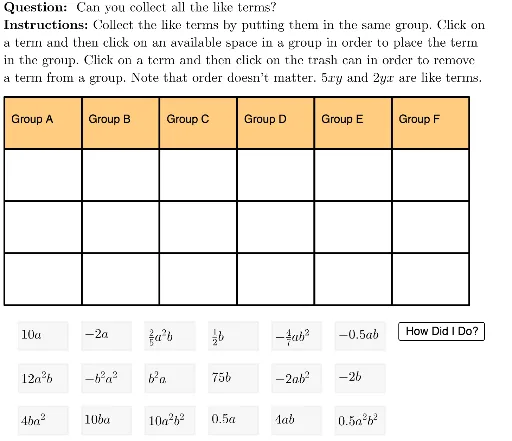
This GeoGebra example is an interactive practice activity for collecting like terms in algebra. It presents a set of algebraic terms that students must match or group based on their variable parts and exponents, reinforcing the fundamental skill of simplifying polynomial expressions. The core mathematical concept is combining like terms, where terms with identical variable factors are added or subtracted. The construction uses GeoGebra commands such as Sequence, Flatten, Shuffle, Zip, Element, and Text to generate randomized term cards and interactive feedback elements. Objects include multiple term variables (term1, term2, etc.), layout parameters (colWidth, rowHeight, tileWidth), and control buttons (TryAnother, HowDidIDo, Initialize) with check marks (cmark, xmark). This is suitable for middle school or early high school algebra students, serving as a classroom exercise or self-study tool to master the rules of simplifying expressions.
GeoGebra Commands & Parameters
Sequence(Polygon[{tableAnchor + ((5 * colWidth), 0 - (rowHeight * i)), tableAnchor + ((6 * colWidth), 0 - (rowHeight * i)), tableAnchor + ((6 * colWidth), 0 - (rowHeight * i) - rowHeight), tableAnchor + ((5 * colWidth), ((-rowHeight) * i) - rowHeight)}], i, 0, lastRow - 1) → tableCol6Sequence(Polygon[{tableAnchor + ((3 * colWidth), 0 - (rowHeight * i)), tableAnchor + ((4 * colWidth), 0 - (rowHeight * i)), tableAnchor + ((4 * colWidth), 0 - (rowHeight * i) - rowHeight), tableAnchor + ((3 * colWidth), ((-rowHeight) * i) - rowHeight)}], i, 0, lastRow - 1) → tableCol4Sequence(Polygon[{tableAnchor + ((2 * colWidth), 0 - (rowHeight * i)), tableAnchor + ((3 * colWidth), 0 - (rowHeight * i)), tableAnchor + ((3 * colWidth), 0 - (rowHeight * i) - rowHeight), tableAnchor + ((2 * colWidth), ((-rowHeight) * i) - rowHeight)}], i, 0, lastRow - 1) → tableCol3Sequence(Polygon[{tableAnchor + (colWidth, 0 - (rowHeight * i)), tableAnchor + ((2 * colWidth), 0 - (rowHeight * i)), tableAnchor + ((2 * colWidth), 0 - (rowHeight * i) - rowHeight), tableAnchor + (colWidth, ((-rowHeight) * i) - rowHeight)}], i, 0, lastRow - 1) → tableCol2Sequence(Polygon[{tableAnchor + (0, 0 - (rowHeight * i)), tableAnchor + (colWidth, 0 - (rowHeight * i)), tableAnchor + (colWidth, 0 - (rowHeight * i) - rowHeight), tableAnchor + (0, ((-rowHeight) * i) - rowHeight)}], i, 0, lastRow - 1) → tableCol1Sequence(Polygon[{tableAnchor + ((4 * colWidth), 0 - (rowHeight * i)), tableAnchor + ((5 * colWidth), 0 - (rowHeight * i)), tableAnchor + ((5 * colWidth), 0 - (rowHeight * i) - rowHeight), tableAnchor + ((4 * colWidth), ((-rowHeight) * i) - rowHeight)}], i, 0, lastRow - 1) → tableCol5Flatten(Sequence[Sequence[(i, j), i, -8, -8 + (5 * (tileWidth + 1)), tileWidth + 1], j, 1, 1 - (2 * (tileHeight + 1)), (-tileHeight) - 1]) → fixedFrameAnchorsShuffle(fixedFrameAnchors) → shuffledFrameAnchorsLaTeX(UnicodeToLetter[10003]) → cmarkLaTeX(UnicodeToLetter[10007]) → xmarkLaTeX((((("\text{" * QUESTION) * "\\") * INSTRUCTIONS) * "}")) → TEXTZip(Polygon[A, A + (tileWidth, 0), A + (tileWidth, (-tileHeight)), A + (0, (-tileHeight))], A, shuffledFrameAnchors) → framesElement(frames, 1) → frame1Element(frames, 2) → frame2Element(frames, 3) → frame3Element(frames, 4) → frame4Element(frames, 5) → frame5Element(frames, 6) → frame6Element(frames, 7) → frame7Element(frames, 8) → frame8Element(frames, 9) → frame9Flatten(Zip[Sequence[Element[A, i], i, 2, 4], A, {tableCol1, tableCol2, tableCol3, tableCol4, tableCol5, tableCol6}]) → cellsElement(cells, 1) → cell1Element(frames, activeTile) → highlightedTileElement(cells, 2) → cell2Element(cells, 3) → cell3Element(cells, 4) → cell4Element(cells, 5) → cell5Element(cells, 7) → cell7Element(cells, 8) → cell8Element(cells, 9) → cell9Element(cells, activeCell) → highlightedCellElement(tableCol1, 1) → col1HeaderCellElement(tableCol2, 1) → col2HeaderCellElement(tableCol3, 1) → col3HeaderCellElement(tableCol4, 1) → col4HeaderCellElement(cells, 6) → cell6Zip(Mod[A, 6] ≟ Mod[B, 6] ∧ Mod[B, 6] ≟ Mod[C, 6] ∧ A ≠ 0 ∧ B ≠ 0 ∧ C ≠ 0, A, Sequence[itemsInCells(i), i, 1, 16, 3], B, Sequence[itemsInCells(j), j, 2, 17, 3], C, Sequence[itemsInCells(k), k, 3, 18, 3]) → cellsCorrectText("", tableAnchor + (0, (-rowHeight) - rowHeight / 3), true, true) → rowHeader1Text("", tableAnchor + (0, ((-rowHeight) * 2) - rowHeight / 3), true, true) → rowHeader2Text("", tableAnchor + (0, ((-rowHeight) * 3) - rowHeight / 3), true, true) → rowHeader3Element(cells, 10) → cell10Element(cells, 11) → cell11Element(cells, 12) → cell12Element(cells, 13) → cell13Element(cells, 14) → cell14Element(cells, 15) → cell15Element(cells, 16) → cell16Element(cells, 17) → cell17Element(cells, 18) → cell18Element(tableCol5, 1) → col5HeaderCellElement(tableCol6, 1) → col6HeaderCellText("Group A", tableAnchor + (0.5, ((-rowHeight)) / 2)) → col1HeaderText("Group B", tableAnchor + (0.5 + colWidth, ((-rowHeight)) / 2)) → col2HeaderText("Group C", tableAnchor + (0.5 + (2 * colWidth), ((-rowHeight)) / 2)) → col3HeaderText("Group D", tableAnchor + (0.5 + (3 * colWidth), ((-rowHeight)) / 2)) → col4HeaderText("Group E", tableAnchor + (0.5 + (4 * colWidth), ((-rowHeight)) / 2)) → col5HeaderLaTeX("\text{You collected all the like terms.}") → feedbackElement(frames, 10) → frame10Element(frames, 11) → frame11Element(frames, 12) → frame12Element(frames, 13) → frame13Element(frames, 14) → frame14Element(frames, 15) → frame15Element(frames, 16) → frame16Element(frames, 17) → frame17Element(frames, 18) → frame18Text("Group F", tableAnchor + (0.5 + (5 * colWidth), ((-rowHeight)) / 2)) → col6HeaderZip(Text[If[A, cmark, ""], Vertex[B, 2] + symbolOffset], A, cellsCorrect, B, {col1HeaderCell, col2HeaderCell, col3HeaderCell, col4HeaderCell, col5HeaderCell, col6HeaderCell}) → cmarkListZip(Text[If[¬A, xmark, ""], Vertex[B, 2] + symbolOffset], A, cellsCorrect, B, {col1HeaderCell, col2HeaderCell, col3HeaderCell, col4HeaderCell, col5HeaderCell, col6HeaderCell}) → xmarkList
AI Drawing Prompt Reference
Draw an interactive table for practicing collecting like terms in algebra. The table has six columns and several rows, with header cells at the top of each column and empty cells below. Above the table, display a question text and instructions. To the right or below, randomly arrange nine square tiles, each containing an algebraic term with variables. The tiles are shuffled randomly, and the user drags them into the table cells to group like terms. Some cells can be highlighted to indicate selection or drop target. Include buttons for checking answers, trying another problem, and initializing the exercise, along with check and cross marks. The layout is clean and suitable for classroom practice.
The prompt above was compiled from the original drawing commands and is for reference only.