
Nomogram: Continuity
Loading the math board and drawing, please wait…
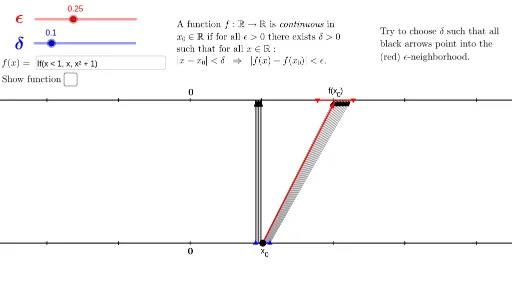
This example demonstrates the construction of a continuity nomogram. Key mathematical concepts include continuity, coordinate geometry, and geometric construction. Using GeoGebra commands such as Sequence, Point, and Vector, the dynamic changes in the nomogram are illustrated. Suitable for high school mathematics education and learning.
GeoGebra Commands & Parameters
Sequence((i, -1), i, -10, 10, 1) → L_1Sequence((i, 1), i, -10, 10, 1) → L_2Point(g) → AVector(A, (h(x(A)), 1)) → uSequence(Vector[(i, -1), (h(i), 1)], i, x(D), x(E), d / 10) → L_3Sequence(Vector[(i, -1), (h(i), 1)], i, -10, 10, 0.2) → L_4Point(u) → FTextfield(h) → InputBox1Segment(B, C) → iSegment(D, E) → j
AI Drawing Prompt Reference
Draw a continuity nomogram. The diagram includes a horizontal line, a point, and a vector. The point is connected to the horizontal line via the vector. The horizontal line represents the coordinate axis, and the vector shows the connection from the point to the axis. The construction order is to draw the horizontal line first, then the point, then the vector, and finally connect the point to the line. The diagram should clearly illustrate the concept of continuity and be suitable for mathematical education.
The prompt above was compiled from the original drawing commands and is for reference only.