
Nine-Point Circle Construction in Triangle
Loading the math board and drawing, please wait…
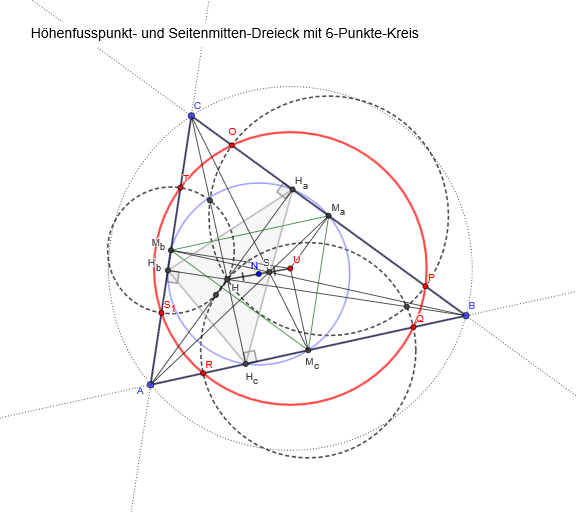
This example demonstrates the construction of the famous Nine-Point Circle (6-Punkte-Kreis) in a triangle. The Nine-Point Circle passes through nine significant points: the midpoints of the three sides, the feet of the three altitudes, and the midpoints of the segments from each vertex to the orthocenter. Construction: Use Polygon to create △ABC, Line and OrthogonalLine to construct altitudes and obtain foot points H_a, H_b, H_c, Segment to mark side midpoints M_a, M_b, M_c, and Circle with Center to draw the circle through these nine points. Objects include vertices A, B, C, orthocenter H, angles α, β, γ, etc. Ideal for secondary school geometry teaching, suitable for teaching special points in triangles and circle construction techniques.
GeoGebra Commands & Parameters
Polygon(A, B, C) → d1, c, a, bLine(A, B) → fLine(B, C) → gLine(C, A) → hOrthogonalLine(A, g) → iOrthogonalLine(B, h) → jOrthogonalLine(C, f) → kIntersect(i, j) → HIntersect(k, f) → H_cIntersect(i, g) → H_aIntersect(j, h) → H_bAngle(B, H_c, H) → αAngle(A, H_b, H) → βAngle(C, H_a, H) → γSegment(H, H_a) → lSegment(H, H_c) → mSegment(H, H_b) → nSegment(H, B) → pSegment(H, C) → qSegment(H, A) → rCircle(A, B, C) → dCenter(d) → UOrthogonalLine(U, f) → sOrthogonalLine(U, g) → tOrthogonalLine(U, h) → eIntersect(e, h) → M_bIntersect(s, f) → M_cIntersect(t, g) → M_aSegment(U, M_c) → f_1Segment(U, M_a) → g_1Segment(U, M_b) → h_1Circle(M_c, H) → c_1Circle(M_a, H) → d_1Circle(M_b, H) → e_1Intersect(e_1, h) → T, S_{1}Intersect(d_1, g) → P, OIntersect(c_1, f) → R, QCircle(S_{1}, R, Q) → k_1Segment(M_a, M_b) → i_1Segment(M_c, M_b) → j_1Segment(M_c, M_a) → l_1Circle(H_a, M_a, H_c) → p_1Center(p_1) → NSegment(N, U) → m_1Segment(N, H) → n_1Polygon(H_c, H_a, H_b) → d2, h_b, h_c, h_aIntersect(d_1, e_1, 2) → DIntersect(c_1, d_1, 2) → EIntersect(c_1, e_1, 2) → FSegment(A, M_a) → q_1Segment(M_b, B) → r_1Segment(C, M_c) → s_1Intersect(q_1, r_1) → S
AI Drawing Prompt Reference
Draw a triangle ABC first, then construct its nine-point circle. Start by creating triangle ABC with points A, B, and C; next, construct the altitudes from vertices A, B, and C to the opposite sides, finding the feet of the altitudes H_a, H_b, and H_c; then locate the orthocenter H of the triangle; after that, find the midpoints M_a, M_b, and M_c of the sides; subsequently, construct circles with H as the center and passing through H_a, H_b, and H_c, intersecting the sides to get nine significant points; finally, use these points to draw the nine-point circle.
The prompt above was compiled from the original drawing commands and is for reference only.