
Net of Triangular Prism
Loading the math board and drawing, please wait…
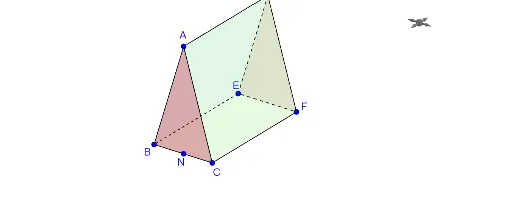
This GeoGebra example demonstrates the net of a triangular prism, showing how the three-dimensional surfaces of the prism are unfolded into a two-dimensional plane. It helps students visualize the correspondence between 3D solids and their 2D nets. Core mathematical concepts include solid geometry, prisms, nets, polygon areas, and spatial reasoning. The construction uses GeoGebra commands such as Segment, Point, Distance, Polygon, Intersect, and Midpoint, along with numerous objects (α, B, b, C, H_1, F, E, f, N_1, h, BN, hyp, NB, A, NC, G, D, poly1, a, b_1, e, d, H, poly2, g, c, f_1, h_1, N_2, I, J, poly3, c_1, i, b_2, poly4, e_1, j, f_2, poly5) to build the prism's faces and their arrangement in the net. This resource is suitable for middle or high school geometry lessons, as well as for exploratory activities in mathematics, enhancing understanding of prism structure and net properties.
GeoGebra Commands & Parameters
Segment(B, C) → fPoint(f) → N_1Distance(B, N_1) → BNDistance(N_1, B) → NBDistance(N_1, C) → NCPolygon(A, B, E, D) → poly1, a, b_1, e, dPolygon(G, C, F, H) → poly2, g, c, f_1, h_1Polygon(I, B, C) → poly3, c_1, i, b_2Polygon(J, F, E) → poly4, e_1, j, f_2Polygon(B, E, F, C) → poly5, b_3, e_2, f_3, c_2Segment(A, B) → kSegment(B, C) → lSegment(G, C) → mSegment(D, E) → nIntersect(b_1, n) → KSegment(E, F) → pSegment(F, H) → qMidpoint(h_1) → LPolygon(M, N, O, P) → poly6, m_1, n_1, o_1, p_1
AI Drawing Prompt Reference
Draw the net of a triangular prism. Start with a triangular base, then unfold three rectangular side faces and a second triangular top face onto a flat plane. Include a segment from one base vertex to the midpoint of the opposite side, with its length marked. Arrange all faces edge-to-edge so they form a connected flat pattern, showing how the 3D prism unfolds into 2D.
The prompt above was compiled from the original drawing commands and is for reference only.