
Net of a Cube by Nick Kochis
Loading the math board and drawing, please wait…
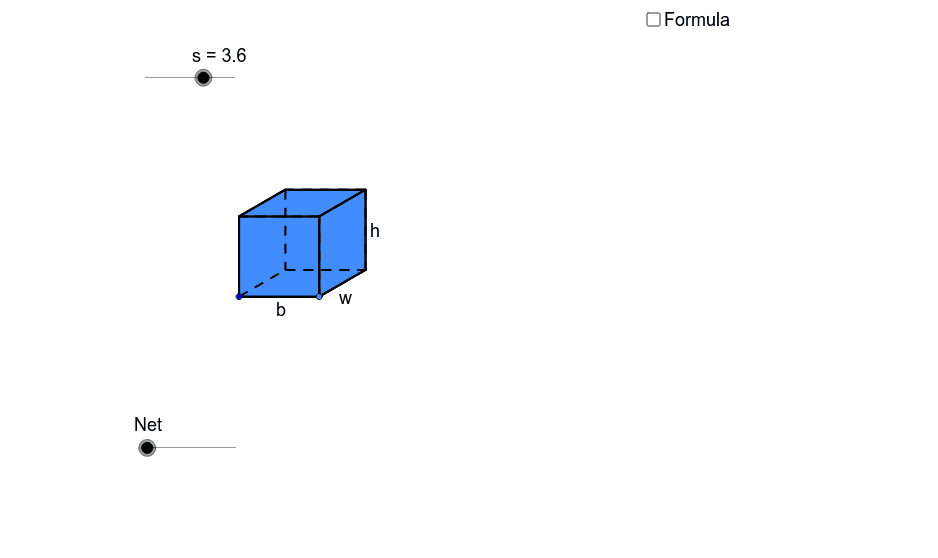
This example demonstrates the net of a cube, illustrating the surface area of a cube. Using GeoGebra commands such as point, line segment, polygon, etc., the net of a cube can be constructed. Suitable for middle and high school students learning solid geometry.
GeoGebra Commands & Parameters
Point(Circle[A, s]) → BSegment(A, B) → aPolygon(A, B, 4) → poly1, a_1, b, c, d, C, DCircle(B, e) → fLine(A, B) → gIntersect(f, g, 2) → ERotate(E, 30°, B) → E'OrthogonalLine(E', g) → hSegment(B, E') → iLine(C, i) → jIntersect(h, j) → FPolygon(E', F, 4) → poly2, e', f_1, k, l, G, HPolygon(A, H, G, D) → poly3, a_2, h_1, g_1, d_1Polygon(C, F, E', B) → poly4, c_1, f_2, e'_1, b_1Circle(B, A) → pCircle(A, B) → qIntersect(q, g, 2) → IIntersect(p, g, 2) → JCircle(J, B) → rIntersect(r, g, 2) → KLine(J, e'_1) → mLine(K, e'_1) → nLine(I, a_2) → tLine(H, E') → e_1Intersect(t, e_1) → LIntersect(m, e_1) → MIntersect(n, e_1) → NLine(B, E') → i_1Line(A, H) → j_1Intersect(f, i_1, 2) → OLine(O, g) → k_1Circle(E', B) → p_1Intersect(p_1, i_1, 2) → PLine(P, e_1) → l_1Intersect(j_1, l_1) → QLine(C, B) → m_1Circle(C, B) → q_1Intersect(q_1, m_1, 2) → RLine(R, c_1) → n_1Intersect(h, n_1) → SIntersect(j_1, k_1) → TCircleArc(C, R, D) → r_1CircleArc(B, K, R) → s_1CircleArc(E', N, S) → t_1CircleArc(E', M, F) → c_2CircleArc(B, J, C) → d_2CircleArc(A, B, I) → e_2CircleArc(H, G, L) → g_2CircleArc(F, S, G) → h_2Vector(F, P) → uVector(C, O) → vVector(D, R) → wVector(S, N) → u_1Vector(D, I) → v_1Translate(D, Vector[(o * w)]) → D'_1Ray(C, D'_1) → b_2Intersect(r_1, b_2, 1) → UTranslate(G, Vector[(o * w)]) → G'_1Ray(F, G'_1) → i_2Intersect(h_2, i_2, 1) → VLineBisector(F, P) → j_2Intersect(f, j_2, 2) → WCircleArc(W, P, F) → k_2Line(W, l_1) → l_2LineBisector(G, Q) → m_2Intersect(l_2, m_2) → ZCircleArc(Z, Q, G) → p_2Translate(C, Vector[((o - 1) * v)]) → C'Translate(D, Vector[((o - 1) * v)]) → D'_2If(o < 1, C, If[o < 2, C', O]) → A_1If(o < 1, D, If[o < 2, D'_2, T]) → B_1Translate(D, Vector[((o - 2) * v_1)]) → D'Translate(G, Vector[((o - 2) * v_1)]) → G'_2Ray(A, D') → n_2Ray(H, G'_2) → q_2Intersect(e_2, n_2, 1) → C_1Intersect(g_2, q_2) → D_1,If(o < 2, G, If[o < 3, D_1, L]) → E_1If(o < 2, D, If[o < 3, C_1, I]) → F_1Translate(G, Vector[((o - 3) * u)]) → G'Translate(F, Vector[((o - 3) * u)]) → F'Ray(H, G') → r_2Ray(E', F') → s_2Intersect(p_2, r_2, 1) → G_1Intersect(k_2, s_2, 1) → H_1If(o < 3, G, If[o < 4, G_1, Q]) → I_1If(o < 3, F, If[o < 4, H_1, P]) → J_1Translate(S, Vector[((o - 4) * u_1)]) → S'Ray(E', S') → t_2Intersect(t_1, t_2, 1) → K_1Intersect(c_2, t_2, 1) → L_1Translate(R, Vector[((o - 4) * u_1)]) → R'Ray(B, R') → a_3Intersect(s_1, a_3, 1) → M_1Intersect(d_2, a_3, 1) → N_1If(o < 1, U, If[o < 4, R, If[o < 5, M_1, K]]) → O_1If(o < 1, V, If[o < 4, S, If[o < 5, K_1, N]]) → P_1If(o < 4, C, If[o < 5, N_1, J]) → Q_1If(o < 4, F, If[o < 5, L_1, M]) → R_1Midpoint(B, E') → S_1Midpoint(A, H) → T_1Line(T_1, S_1) → c_3Circle(S_1, a / 2) → d_3OrthogonalLine(S_1, c_3) → g_3Intersect(d_3, g_3) → U_1, V_1Polygon(U_1, V_1, 4) → poly11, u_2, v_2, k_3, l_3, W_1, Z_1Polygon(Z_1, W_1, 4) → poly12, z_1, w_1, m_3, n_3, A_2, B_2Polygon(U_1, Z_1, 4) → poly13, u_3, z_2, s_3, t_3, C_2, D_2Polygon(W_1, V_1, 4) → poly14, w_2, v_3, c_4, d_4, E_2, F_2Polygon(V_1, U_1, 4) → poly15, v_4, u_4, e_4, f_4, G_2, H_2Polygon(H_2, G_2, 4) → poly16, h_6, g_4, i_4, j_4, I_2, J_2Segment(B, U_1) → m_4LineBisector(m_4) → n_4Vector(B, U_1) → zVector(T, C_2) → z_4Vector(L, A_2) → u_5Vector(P, E_2) → w_5Translate(I, Vector[(z * (o - 5))]) → I'Translate(A, Vector[(z * (o - 5))]) → A'Translate(B, Vector[(z * (o - 5))]) → B'Translate(J, Vector[(z * (o - 5))]) → J'Translate(K, Vector[(z * (o - 5))]) → K'Translate(L, Vector[(u_5 * (o - 5))]) → L'Translate(H, Vector[(u_5 * (o - 5))]) → H'Translate(E', Vector[(u_5 * (o - 5))]) → E''Translate(M, Vector[(u_5 * (o - 5))]) → M'Translate(N, Vector[(u_5 * (o - 5))]) → N'Translate(T, Vector[(z_4 * (o - 5))]) → T'Translate(O, Vector[(z_4 * (o - 5))]) → O'Translate(P, Vector[(w_5 * (o - 5))]) → P'Translate(Q, Vector[(w_5 * (o - 5))]) → Q'If(o < 5, O_1, If[o < 6, K', I_2]) → K_2If(o < 5, P_1, If[o < 6, N', J_2]) → L_2If(o < 5, Q_1, If[o < 6, J', G_2]) → M_2If(o < 5, R_1, If[o < 6, M', H_2]) → N_2If(o < 5, E', If[o < 6, E'', V_1]) → O_2If(o < 5, H, If[o < 6, H', W_1]) → P_2If(o < 5, E_1, If[o < 6, L', A_2]) → Q_2If(o < 5, J_1, If[o < 6, P', E_2]) → R_2If(o < 5, I_1, If[o < 6, Q', F_2]) → S_2If(o < 5, B, If[o < 6, B', U_1]) → T_2If(o < 5, A, If[o < 6, A', Z_1]) → U_2If(o < 5, A_1, If[o < 6, O', D_2]) → V_2If(o < 5, B_1, If[o < 6, T', C_2]) → W_2If(o < 5, F_1, If[o < 6, I', B_2]) → Z_2Polygon(Z_2, Q_2, P_2, U_2) → poly5, z_3, q_3, p_3, u_6Polygon(U_2, T_2, V_2, W_2) → poly6, u_7, t_4, v_5, w_3Polygon(U_2, P_2, O_2, T_2) → poly7, u_8, p_4, o_2, t_5Polygon(O_2, N_2, M_2, T_2) → poly8, o_1, n_5, m_5, t_6Polygon(N_2, L_2, K_2, M_2) → poly9, n_6, l_4, k_4, m_6Polygon(O_2, R_2, S_2, P_2) → poly10, o_3, r_3, s_4, p_5Intersect(k, v_5) → B_3Segment(G, B_3) → b_3Intersect(v_5, a_2) → A_3Segment(P_2, A_3) → e_3Intersect(t_4, p_5) → C_3Intersect(m_5, p_5) → D_3Segment(D_3, C_3) → f_3Segment(D_3, P_2) → h_3Point(Circle[E_3, s]) → F_3Segment(E_3, F_3) → j_3Line(E_3, F_3) → a_4Circle(F_3, e) → h_4Intersect(h_4, a_4, 2) → G_3Rotate(G_3, 30°, F_3) → H_3Segment(F_3, H_3) → b_4Line(H_3, j_3) → q_4Line(E_3, b_4) → r_4Intersect(q_4, r_4) → I_3OrthogonalLine(H_3, q_4) → a_5OrthogonalLine(F_3, j_3) → b_5OrthogonalLine(E_3, a_4) → c_5OrthogonalLine(I_3, q_4) → d_5Circle(E_3, s) → e_5Intersect(e_5, c_5, 2) → J_3OrthogonalLine(J_3, c_5) → f_5Circle(I_3, s) → g_5Intersect(g_5, d_5, 2) → K_3OrthogonalLine(K_3, d_5) → h_5Intersect(a_5, h_5) → L_3Intersect(b_5, f_5) → M_3Polygon(J_3, M_3, L_3, K_3) → poly17, j_5, m_7, l_5, k_5Polygon(J_3, E_3, F_3, M_3) → poly18, j_6, e_6, f_6, m_8Polygon(F_3, M_3, L_3, H_3) → poly19, f_7, m_9, l_6, h_7Polygon(I_3, K_3, L_3, H_3) → poly20, i_5, k_6, l_7, h_8Polygon(E_3, J_3, K_3, I_3) → poly21, e_7, j_7, k_7, i_6Polygon(E_3, I_3, H_3, F_3) → poly22, e_8, i_7, h_9, f_8
AI Drawing Prompt Reference
Draw an unfolded cube net, showing the connection of its six faces. Start with a square as the base, then rotate and connect other squares to form the net. Ensure the drawing is clear and lines are simple to understand the concept of the cube's surface area.
The prompt above was compiled from the original drawing commands and is for reference only.