
Nested Spheres
Loading the math board and drawing, please wait…
In collections
geometriadinamica.es
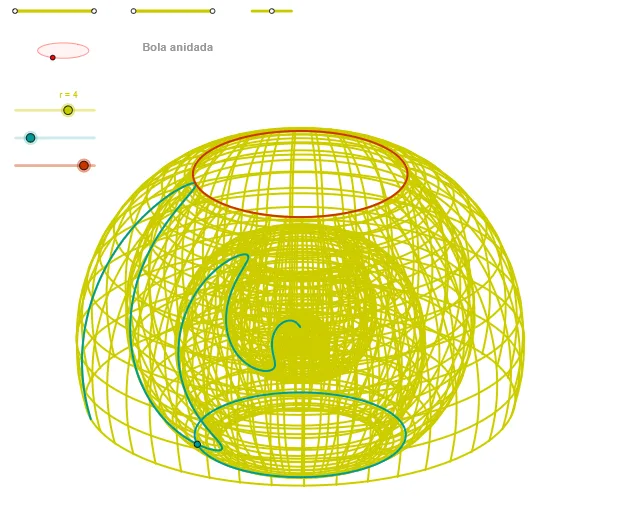
This example demonstrates a nested spheres graph, showcasing the geometric properties of spheres. Key mathematical concepts include geometric shapes, conic sections, and the relationships between spheres. Construction points include using GeoGebra commands Segment, Point, OrthogonalLine, Circle, Intersect, and Ellipse. Suitable for teaching middle school mathematics and geometry.
GeoGebra Commands & Parameters
Segment(Q5, Q6) → p5Point(p5) → P5Segment(Q3, Q4) → p2Point(p2) → P3Segment(P3, Q4) → p4Point(p4) → P4Segment(Q1, Q2) → p1Point(p1) → P1Segment(P1, Q2) → p3Point(p3) → P2OrthogonalLine(C, xAxis) → zz2Circle(C, 0.62) → zz0Intersect(zz0, zz2, 1) → ZZ4Intersect(zz0, zz2, 2) → ZZ3Ellipse(ZZ3, ZZ4, 0.65) → zElipse2Point(zElipse2) → ZIntersect(zElipse2, zz2) → ZZ7, ZZ8Angle(ZZ8, C, Z) → zAngIncOrthogonalLine(C, yAxis) → zz1Intersect(zz0, zz1, 2) → ZZ2Intersect(zz0, zz1, 1) → ZZ1Ellipse(ZZ1, ZZ2, 0.65) → zElipse1Point(zElipse1) → XYIntersect(zElipse1, zz1) → ZZ5, ZZ6Angle(ZZ6, C, XY) → zAngRotSegment(ZZ5, ZZ6) → zz4Segment(ZZ7, ZZ8) → zz3Intersect(zElipse2, zElipse1, 1) → zPunto1Intersect(zElipse2, zElipse1, 4) → zPunto2Segment(zPunto1, zPunto2) → zSeg2CurveCartesian((r / 10 * ((((u * cos(cos(u))) * cos(α)) * sin(zAngRot)) + (((u * cos(cos(u))) * sin(α)) * cos(zAngRot)))), (r / 10 * ((((((-u) * cos(cos(u))) * cos(α)) * cos(zAngRot)) * sin(zAngInc)) + ((((u * cos(cos(u))) * sin(α)) * sin(zAngRot)) * sin(zAngInc)) + ((u * sin(cos(u))) * cos(zAngInc)))), u, u1, u2) → curva2CurveCartesian((r / 10 * ((((β * cos(cos(β))) * cos(v)) * sin(zAngRot)) + (((β * cos(cos(β))) * sin(v)) * cos(zAngRot)))), (r / 10 * ((((((-β) * cos(cos(β))) * cos(v)) * cos(zAngRot)) * sin(zAngInc)) + ((((β * cos(cos(β))) * sin(v)) * sin(zAngRot)) * sin(zAngInc)) + ((β * sin(cos(β))) * cos(zAngInc)))), v, v1, v2) → a1CurveCartesian((r * (((cos(cos(10)) * cos(v)) * sin(zAngRot)) + ((cos(cos(10)) * sin(v)) * cos(zAngRot)))), (r * (((((-cos(cos(10))) * cos(v)) * cos(zAngRot)) * sin(zAngInc)) + (((cos(cos(10)) * sin(v)) * sin(zAngRot)) * sin(zAngInc)) + (sin(cos(10)) * cos(zAngInc)))), v, v1, v2) → curva1Sequence(CurveCartesian[(r / 10 * ((((u * cos(cos(u))) * cos(v)) * sin(zAngRot)) + (((u * cos(cos(u))) * sin(v)) * cos(zAngRot)))), (r / 10 * ((((((-u) * cos(cos(u))) * cos(v)) * cos(zAngRot)) * sin(zAngInc)) + ((((u * cos(cos(u))) * sin(v)) * sin(zAngRot)) * sin(zAngInc)) + ((u * sin(cos(u))) * cos(zAngInc)))), v, v1, v2], u, u1, u2, paso) → list2Sequence(CurveCartesian[(r / 10 * ((((u * cos(cos(u))) * cos(v)) * sin(zAngRot)) + (((u * cos(cos(u))) * sin(v)) * cos(zAngRot)))), (r / 10 * ((((((-u) * cos(cos(u))) * cos(v)) * cos(zAngRot)) * sin(zAngInc)) + ((((u * cos(cos(u))) * sin(v)) * sin(zAngRot)) * sin(zAngInc)) + ((u * sin(cos(u))) * cos(zAngInc)))), u, u1, u2], v, v1, v2, paso) → list1
AI Drawing Prompt Reference
Create a “nested spheres” geometry illustration: use the same reference center C and first draw two perpendicular axes through C. Construct two circles centered at C and use their intersections with the corresponding perpendicular direction lines to obtain two key point sets. From each point set, form an ellipse, then mark important points from the ellipse intersections with the respective axis directions and connect selected key points with short segments. Finally, generate two families of parametric curves whose placement is governed by the established angular relations (rotation and inclination) so the two layers interweave across the ellipses’ implied cross-sections, conveying a nested-spheres effect.
The prompt above was compiled from the original drawing commands and is for reference only.