
Multiplying Fractions Using the Area Model
Loading the math board and drawing, please wait…
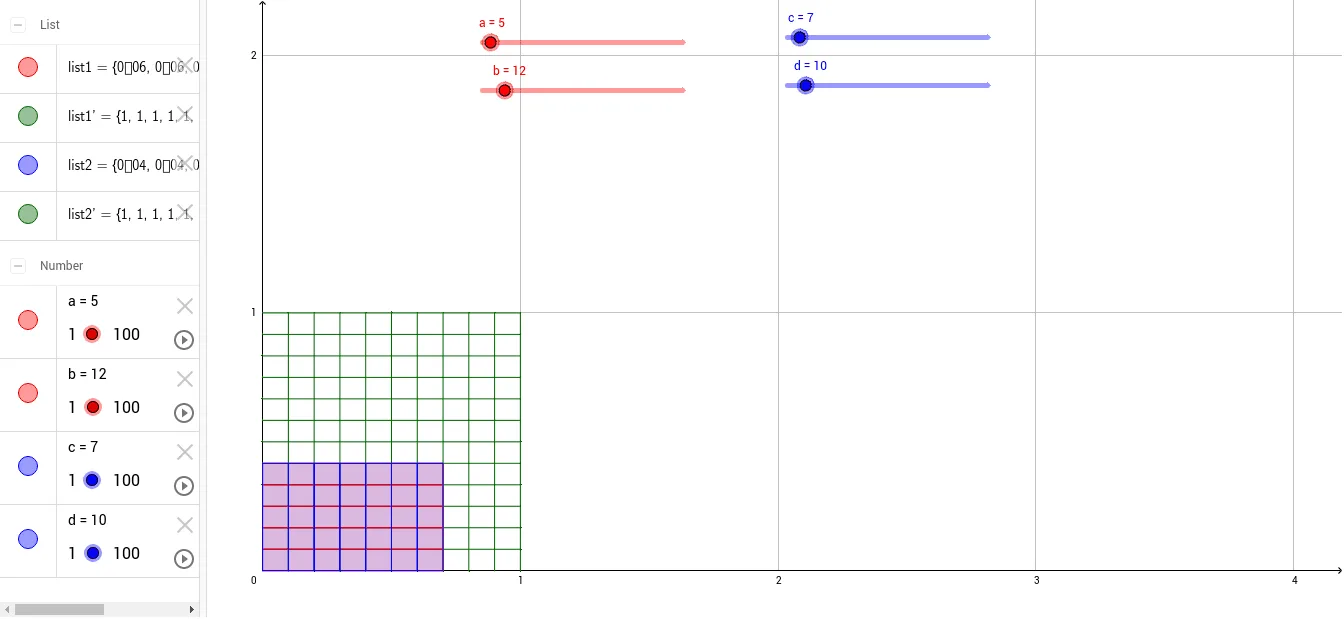
① This example demonstrates the multiplication of two fractions through an area model, turning the abstract operation into a visual rectangle divided into parts with the overlapping region representing the product. ② Core mathematical concepts include fraction multiplication, unit fractions, area and part-whole relationships, along with introductory ideas of ratios and linear functions. ③ Construction highlights: using GeoGebra's Sequence command to generate objects (a, b, c, d, list1', list2', list1, list2), dynamically partitioning the rectangle and shading the intersection to show the product of numerators and denominators; sliders allow adjusting fraction values for exploration. ④ Suitable for upper elementary to middle school students learning fraction operations, and for teachers demonstrating the conceptual basis of fraction multiplication beyond rote memorization.
GeoGebra Commands & Parameters
Sequence(Segment[(0, k / b), (1, k / b)], k, 1, b) → list1'Sequence(Segment[(k / d, 0), (k / d, 1)], k, 1, d) → list2'Sequence(Polygon[{(0, k / b), (c / d, k / b), (c / d, (k - 1) / b), (0, (k - 1) / b)}], k, 1, a) → list1Sequence(Polygon[{(k / d, 0), (k / d, a / b), ((k - 1) / d, a / b), ((k - 1) / d, 0)}], k, 1, c) → list2
AI Drawing Prompt Reference
Draw a unit square divided into a grid by equally spaced horizontal and vertical lines. Shade the bottom several rows with one color to represent the first fraction, and shade the left several columns with another color for the second fraction. The overlapping shaded rectangle in the corner shows the product of the two fractions. Include sliders to adjust the number of rows, columns, and the counts of shaded rows and columns, so the fractions and their product update dynamically.
The prompt above was compiled from the original drawing commands and is for reference only.