
Horizontal Rectangles Rotated About the Y-axis
Loading the math board and drawing, please wait…
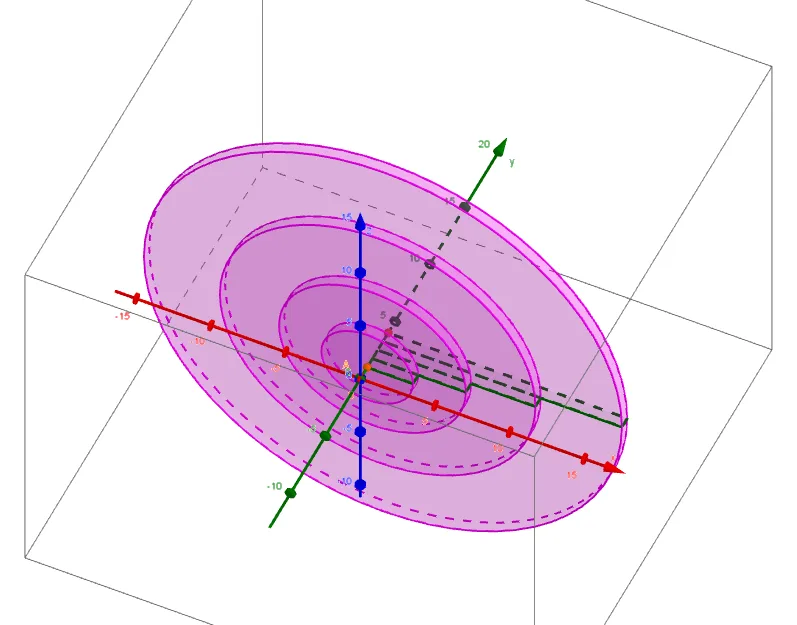
This example demonstrates the solid figure formed by rotating horizontal rectangles about the y-axis. It involves core mathematical concepts such as rotation, coordinate geometry, function graphing, and trigonometry. Key construction steps include using GeoGebra commands like ImplicitCurve, Point, Sequence, Rotate, and Textfield, with objects like f, c, n, A, B, b, a, w, r_k, θ, rects, rects', discs, InputBox1, and d. Suitable for high school and above students studying solids of revolution and calculus applications.
GeoGebra Commands & Parameters
ImplicitCurve(f(x, y)) → cPoint(yAxis) → APoint(Ray[A, A + (0, 1)]) → BSequence(x(Intersect[c, ((-(x(Ray[(0, a + (k * w)), (1, a + (k * w))]) / y(Ray[(0, a + (k * w)), (1, a + (k * w))]))) * x) - z(Ray[(0, a + (k * w)), (1, a + (k * w))]) / y(Ray[(0, a + (k * w)), (1, a + (k * w))]), 1]), k, 1, n) → r_kSequence(Polygon[{(0, a + ((k - 1) * w)), (0, a + (k * w)), (Element[r_k, k], a + (k * w)), (Element[r_k, k], a + ((k - 1) * w))}], k, 1, n) → rectsRotate(rects, θ, yAxis) → rects'Sequence(Cylinder[(0, a + ((k - 1) * w)), (0, a + (k * w)), Element[r_k, k]], k, 1, n) → discsTextfield(f) → InputBox1
AI Drawing Prompt Reference
Draw a solid figure formed by rotating horizontal rectangles about the y-axis. First, create an implicit curve c. Then, take two points A and B on the y-axis. Construct a sequence of horizontal rectangles r_k and rotate them around the y-axis to form a sequence of rectangles rects'. Finally, use these rectangles to create a sequence of cylinders discs, forming the rotated solid.
The prompt above was compiled from the original drawing commands and is for reference only.