
Multiplication Visualization Tool
Loading the math board and drawing, please wait…
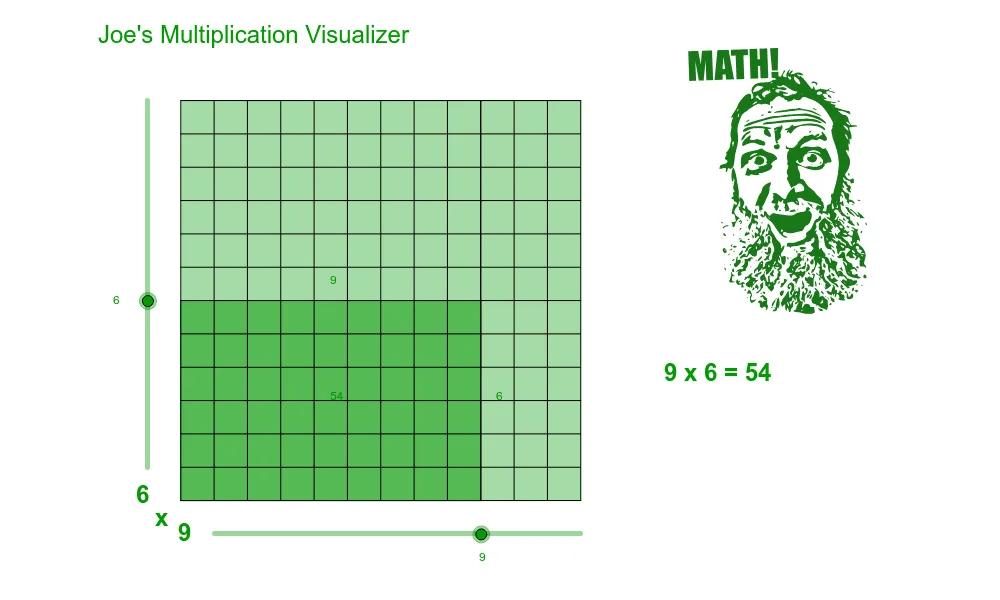
This is a multiplication visualization tool that helps users understand multiplication operations intuitively. Core math concepts include functions and geometric construction. Commands used include Intersect, Line, OrthogonalLine, Polygon, and Segment. Suitable for high-grade elementary and junior high school students to learn multiplication and geometry.
GeoGebra Commands & Parameters
Intersect(xAxis, yAxis) → originLine(origin, xAxis) → y_0Line(origin, yAxis) → yaxisOrthogonalLine(xfactor1, y_0) → factor1lineOrthogonalLine(yfactor2, yaxis) → factor2lineIntersect(factor1line, factor2line) → xyfactorsPolygon(origin, xfactor1, xyfactors, yfactor2) → poly1, origin_1, xfactor1_1, xyfactors_1, yfactor2_1Intersect(yaxis, y_{12}) → AIntersect(yaxis, y_{11}) → BIntersect(yaxis, y_{10}) → CIntersect(yaxis, y_9) → DIntersect(yaxis, y_8) → EIntersect(yaxis, y_7) → FIntersect(yaxis, y_6) → GIntersect(yaxis, y_5) → HIntersect(yaxis, y_4) → IIntersect(yaxis, y_3) → JIntersect(yaxis, y_2) → KIntersect(yaxis, y_1) → LIntersect(y_{12}, x_{12}) → MIntersect(y_{11}, x_{12}) → NIntersect(y_{10}, x_{12}) → OIntersect(y_9, x_{12}) → PIntersect(y_8, x_{12}) → QIntersect(y_7, x_{12}) → RIntersect(y_6, x_{12}) → SIntersect(y_5, x_{12}) → TIntersect(y_4, x_{12}) → UIntersect(factor2line, y_3) → VIntersect(factor2line, y_3) → WIntersect(factor2line, y_3) → ZIntersect(y_2, x_{12}) → A_1Intersect(y_1, x_{12}) → B_1Intersect(y_3, x_{12}) → C_1Intersect(y_{12}, x_1) → D_1Intersect(y_{12}, x_2) → E_1Intersect(factor1line, y_{12}) → F_1Intersect(y_{12}, x_4) → G_1Intersect(y_{12}, x_5) → H_1Intersect(y_{12}, x_6) → I_1Intersect(y_{12}, x_7) → J_1Intersect(y_{12}, x_8) → K_1Intersect(y_{12}, x_9) → L_1Intersect(y_{12}, x_{10}) → M_1Intersect(y_{12}, x_{11}) → N_1Intersect(y_0, x_{12}) → O_1Intersect(y_0, x_{11}) → P_1Intersect(y_0, x_{10}) → Q_1Intersect(y_0, x_9) → R_1Intersect(y_0, x_8) → S_1Intersect(y_0, x_7) → T_1Intersect(y_0, x_6) → U_1Intersect(y_0, x_5) → V_1Intersect(y_0, x_4) → W_1Intersect(y_0, x_3) → Z_1Intersect(y_0, x_2) → A_2Intersect(y_0, x_1) → B_2Intersect(y_{12}, x_3) → C_2Intersect(factor2line, yaxis) → D_2Segment(A, M) → aSegment(B, N) → bSegment(C, O) → cSegment(D, P) → dSegment(E, Q) → eSegment(F, R) → fSegment(G, S) → gSegment(H, T) → hSegment(J, C_1) → jSegment(K, A_1) → kSegment(L, B_1) → lSegment(origin, O_1) → mSegment(A, origin) → nSegment(D_1, B_2) → pSegment(E_1, A_2) → qSegment(C_2, Z_1) → rSegment(F_1, xfactor1) → sSegment(H_1, V_1) → tSegment(I_1, U_1) → a_1Segment(J_1, T_1) → b_1Segment(K_1, S_1) → c_1Segment(L_1, R_1) → d_1Segment(M_1, Q_1) → e_1Segment(N_1, P_1) → f_1Segment(M, O_1) → g_1Segment(G_1, W_1) → h_1Segment(I, U) → iPolygon(origin, A, M, O_1) → poly2, origin_2, a_2, m_1, o_1
AI Drawing Prompt Reference
On a coordinate plane, start at the origin and draw two perpendicular lines along the horizontal and vertical axes. Pick a point on the horizontal axis and draw a vertical line through it; pick another point on the vertical axis and draw a horizontal line through it; these two lines intersect at a point. Connect the origin, the point on the horizontal axis, the intersection point, and the point on the vertical axis to form a rectangle. Then, mark equally spaced points along the vertical axis from the origin upward, and through each draw a horizontal line; similarly, mark equally spaced points along the horizontal axis from the origin rightward, and through each draw a vertical line. These parallel lines cross each other, forming a grid, and also intersect the axes and the rectangle sides, producing many intersection points that illustrate the correspondence of factors in multiplication.
The prompt above was compiled from the original drawing commands and is for reference only.