
Movable Rhombus
Loading the math board and drawing, please wait…
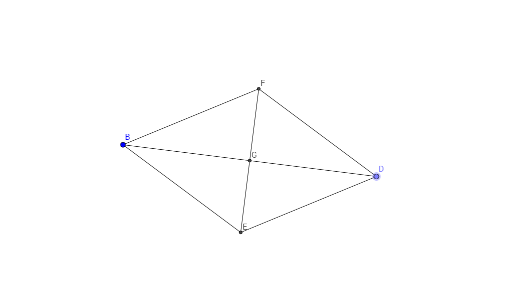
This example demonstrates a movable rhombus and its related geometric properties. Key math concepts include the definition of a rhombus, perpendicular bisectors of diagonals, angle bisectors, isosceles triangles, and logarithmic operations. Construction highlights involve using GeoGebra commands like Line, Point, Segment, LineBisector, and Intersect to build the rhombus and its geometric elements. Suitable for middle school and above students exploring geometric transformations, symmetry, and algebraic calculations.
GeoGebra Commands & Parameters
Line(A, B) → fLine(C, f) → gPoint(g) → DSegment(D, B) → hLineBisector(D, B) → iIntersect(f, i) → EIntersect(g, i) → FSegment(D, F) → jSegment(B, E) → kSegment(D, E) → lSegment(B, F) → mSegment(E, F) → nIntersect(h, n) → G
AI Drawing Prompt Reference
Draw a movable rhombus, highlighting its diagonals' perpendicular bisectors and angle bisectors, along with the isosceles triangles formed by these segments. Connect the vertices to form the rhombus, and mark the intersection points of the diagonals with their perpendicular bisectors. Connect these points to complete the rhombus and show symmetry by drawing lines from the intersection points to the vertices.
The prompt above was compiled from the original drawing commands and is for reference only.