
Motion on a Ramp: Vector Decomposition and Uniform Acceleration Simulation
Loading the math board and drawing, please wait…
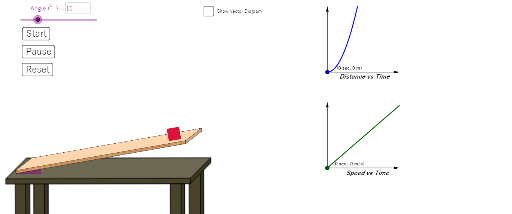
This GeoGebra example simulates the motion of an object sliding down an inclined ramp, with interactive sliders for time and acceleration to visualize displacement, velocity changes, and force decomposition. The core mathematical concepts include vector decomposition (resolving gravity into components parallel and perpendicular to the ramp), uniform accelerated linear motion equations, trigonometric relationships between angle and slope, and geometric construction. The construction uses GeoGebra commands such as Rotate, Angle, Vector, Circle, Segment, Intersect, Polygon, Line, OrthogonalLine, Point, Midpoint, CircleSector, and Textfield to build the ramp polygon, normal line, displacement and acceleration vectors, time slider, and interactive buttons, with text fields displaying real-time values. This is suitable for high school physics or mathematics courses covering vectors, kinematics, and geometric modeling, as well as for pre-university students exploring parametric dynamic demonstrations.
GeoGebra Commands & Parameters
Rotate(G, a°, H) → G'Angle(G, H, G') → γRotate(I, a°, J) → I'Angle(I, J, I') → δVector(I, J) → eCircle(J, normal) → gSegment(I', J) → hIntersect(g, h) → O,Vector(I, O) → iVector(O, J) → jVector(I, P) → rPolygon(L, K, 4) → poly1, k, l, n, q, M, NSegment(H, G') → pLine(F, Q) → fOrthogonalLine(F, f) → sPoint(s) → EMidpoint(J, I) → RMidpoint(J, I') → SMidpoint(I, P) → TMidpoint(I, O) → UMidpoint(S, J) → VMidpoint(R, J) → WPoint(e) → ZPoint(f) → A_1CircleSector(F, B_1, A_1) → cTextfield(a) → InputBox1Vector(C_1, D_1) → uVector(C_1, E_1) → v_1Vector(F_1, G_1) → wVector(F_1, H_1) → bCircleSector(Z, R, S) → c_1
AI Drawing Prompt Reference
Draw an inclined ramp with a block sliding down it. The ramp is a polygon, with a normal line perpendicular to its surface. Decompose the gravity vector into two components: one parallel and one perpendicular to the ramp, shown as arrows. Display an arc indicating the angle of inclination, with its measure labeled. The block's position changes over time, shown by a displacement segment and a velocity vector. Include a time slider and an acceleration input box for interactive control. Also, draw an auxiliary circle in a blank area to illustrate the vector decomposition, marking relevant points on the circle to show the relationships between vectors.
The prompt above was compiled from the original drawing commands and is for reference only.