
Mondrian Art Fractions: Color Area Proportions as Fractions
Loading the math board and drawing, please wait…
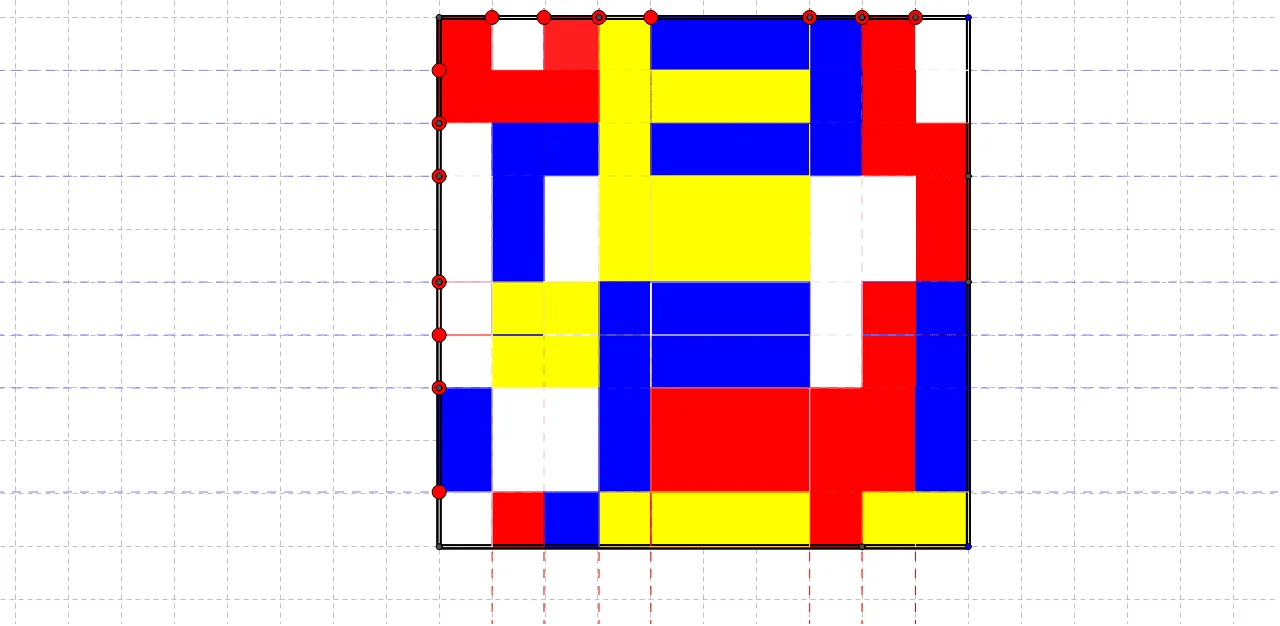
This GeoGebra example demonstrates how changing the proportions of red, white, blue, and yellow regions in a Mondrian-style partition affects their corresponding fractions of the total area. It focuses on reasoning about fraction/percentage equivalence and checking that the sum of all colored parts matches the whole, as well as comparing how one color’s area relates to another. The construction uses core commands from the provided construction summary: Polygon and Point to define the outer shape and key vertices, Line to create the partition lines, and Intersect to compute intersection points that determine the boundaries of each colored region (e.g., objects like A, B, poly1, C, D, E and their numbered variants). Suitable for middle/high school learners and for classroom interactive activities on fraction modeling through geometry, area proportion, and visual verification.
GeoGebra Commands & Parameters
Polygon(A, B, 4) → poly1, a, b, c, d, C, DPoint(c) → ELine(E, b) → ePolygon(A_1, B_1, 4) → poly1_1, a_1, b_1, c_1, d_1, C_1, D_1Point(c) → FLine(F, e) → fPoint(c) → GLine(G, b) → gPoint(c) → HLine(H, b) → hPoint(c) → ILine(I, b) → iPoint(c) → JLine(J, b) → jPoint(c) → KLine(K, b) → kPoint(b) → LLine(L, c) → lPoint(b) → MLine(M, c) → mPoint(b) → NLine(N, c) → nPoint(b) → OLine(O, c) → pPoint(b) → PLine(P, c) → qPoint(b) → QLine(Q, a) → rPoint(b) → RLine(R, a) → sIntersect(j, l) → SIntersect(j, m) → TIntersect(j, n) → UIntersect(j, p) → VIntersect(j, q) → WIntersect(r, j) → ZIntersect(s, j) → F_1Intersect(s, poly1) → G_1, H_1Intersect(h, s) → I_1Intersect(r, h) → J_1Intersect(h, q) → K_1Intersect(h, poly1) → L_1, M_1Intersect(p, h) → N_1Intersect(h, n) → O_1Intersect(h, m) → P_1Intersect(h, l) → Q_1Intersect(e, l) → R_1Intersect(e, m) → S_1Intersect(e, n) → T_1Intersect(e, p) → U_1Intersect(e, q) → V_1Intersect(e, r) → W_1Intersect(e, s) → Z_1Intersect(s, g) → A_2Intersect(r, g) → B_2Intersect(g, q) → C_2Intersect(p, g) → D_2Intersect(n, g) → E_2Intersect(g, m) → F_2Intersect(g, l) → G_2Intersect(f, l) → H_2Intersect(f, poly1) → I_2, J_2Intersect(m, f) → K_2Intersect(f, n) → L_2Intersect(p, poly1) → M_2, N_2Intersect(p, f) → O_2Intersect(f, poly1) → P_2, Q_2Intersect(q, f) → R_2Intersect(r, f) → S_2Intersect(s, f) → T_2Intersect(s, i) → U_2Intersect(r, i) → V_2Intersect(q, i) → W_2Intersect(p, i) → Z_2Intersect(n, poly1) → A_3, B_3Intersect(i, poly1) → C_3, D_3Intersect(n, i) → E_3Intersect(i, m) → F_3Intersect(i, l) → G_3Intersect(l, k) → H_3Intersect(m, k) → I_3Intersect(n, k) → J_3Intersect(p, k) → K_3Intersect(q, k) → L_3Intersect(r, poly1) → M_3, N_3Intersect(r, poly1) → O_3, P_3Intersect(k, r) → Q_3Intersect(k, s) → R_3Intersect(m, d) → S_3Intersect(l, d) → T_3Intersect(q, d) → U_3Intersect(e, a) → V_3Intersect(j, a) → W_3Intersect(e, poly1) → Z_3, A_4Intersect(g, a) → B_4Intersect(k, a) → C_4Polygon(C, L, S, J) → poly2, c_2, l_1, s_1, j_1Polygon(L, M, T, S) → poly3, l_2, m_1, t, s_2Polygon(M, N, U, T) → poly4, m_2, n_1, u, t_1Polygon(N, O, V, U) → poly5, n_2, o, v, u_1Polygon(O, P, W, V) → poly6, o_1, p_1, w, v_1Polygon(P, Q, Z, W) → poly7, p_2, q_1, z, w_1Polygon(Q, R, F_1, Z) → poly8, q_2, r_1, f_1, z_1Polygon(R, B, W_3, F_1) → poly9, r_2, b_2, w_3, f_2Polygon(W_3, F_1, I_1, L_1) → poly10, w_2, f_3, i_1, l_3Polygon(F_1, Z, J_1, I_1) → poly11, f_4, z_2, j_2, i_2Polygon(W, Z, J_1, K_1) → poly12, w_4, z_3, j_3, k_1Polygon(W, K_1, N_1, V) → poly13, w_5, k_2, n_3, v_2Polygon(V, U, O_1, N_1) → poly14, v_3, u_2, o_2, n_4Polygon(U, T, P_1, O_1) → poly15, u_3, t_2, p_3, o_3Polygon(T, S, Q_1, P_1) → poly16, t_3, s_3, q_3, p_4Polygon(S, J, H, Q_1) → poly17, s_4, j_4, h_1, q_4Polygon(Q_1, R_1, E, H) → poly18, q_5, r_3, e_2, h_2Polygon(Q_1, P_1, S_1, R_1) → poly19, q_6, p_5, s_5, r_4Polygon(P_1, O_1, T_1, S_1) → poly20, p_6, o_4, t_4, s_6Polygon(O_1, N_1, U_1, T_1) → poly21, o_5, n_5, u_4, t_5Polygon(N_1, K_1, V_1, U_1) → poly22, n_6, k_3, v_4, u_5Polygon(K_1, J_1, W_1, V_1) → poly23, k_4, j_5, w_6, v_5Polygon(J_1, I_1, Z_1, W_1) → poly24, j_6, i_3, z_4, w_7Polygon(I_1, L_1, V_3, Z_1) → poly25, i_4, l_4, v_6, z_5Polygon(V_3, B_4, A_2, Z_1) → poly26, v_7, b_4, a_2, z_6Polygon(Z_1, W_1, B_2, A_2) → poly27, z_7, w_8, b_3, a_3Polygon(W_1, V_1, C_2, B_2) → poly28, w_9, v_8, c_3, b_5Polygon(V_1, C_2, D_2, U_1) → poly29, v_9, c_4, d_2, u_6Polygon(U_1, T_1, E_2, D_2) → poly30, u_7, t_6, e_3, d_3Polygon(T_1, S_1, F_2, E_2) → poly31, t_7, s_7, f_5, e_4Polygon(S_1, R_1, G_2, F_2) → poly32, s_8, r_5, g_2, f_6Polygon(R_1, E, G, G_2) → poly33, r_6, e_5, g_1, g_3Polygon(G_2, H_2, F, G) → poly34, g_4, h_3, f_7, g_5Polygon(G_2, F_2, K_2, H_2) → poly35, g_6, f_8, k_5, h_4Polygon(F_2, E_2, L_2, K_2) → poly36, f_9, e_6, l_5, k_6Polygon(E_2, D_2, O_2, L_2) → poly37, e_7, d_4, o_6, l_6Polygon(D_2, C_2, R_2, O_2) → poly38, d_5, c_5, r_7, o_7Polygon(C_2, B_2, S_2, R_2) → poly39, c_6, b_6, s_9, r_8Polygon(B_2, A_2, T_2, S_2) → poly40, b_7, a_4, t_8, s_{10}Polygon(A_2, B_4, I_2, T_2) → poly41, a_5, b_8, i_5, t_9Polygon(I_2, C_3, U_2, T_2) → poly42, i_6, c_7, u_8, t_{10}Polygon(T_2, S_2, V_2, U_2) → poly43, t_{11}, s_{11}, v_{10}, u_9Polygon(S_2, R_2, W_2, V_2) → poly44, s_{12}, r_9, w_{10}, v_{11}Polygon(R_2, O_2, Z_2, W_2) → poly45, r_{10}, o_8, z_8, w_{11}Polygon(O_2, L_2, E_3, Z_2) → poly46, o_9, l_7, e_8, z_9Polygon(L_2, E_3, F_3, K_2) → poly47, l_8, e_9, f_{10}, k_7Polygon(K_2, F_3, G_3, H_2) → poly48, k_8, f_{11}, g_7, h_5Polygon(H_2, G_3, I, F) → poly49, h_6, g_8, i_7, f_{12}Polygon(G_3, H_3, K, I) → poly50, g_9, h_7, k_9, i_8Polygon(G_3, F_3, I_3, H_3) → poly51, g_{10}, f_{13}, i_9, h_8Polygon(E_3, J_3, I_3, F_3) → poly52, e_{10}, j_7, i_{10}, f_{14}Polygon(E_3, Z_2, K_3, J_3) → poly53, e_{11}, z_{10}, k_{10}, j_8Polygon(Z_2, W_2, L_3, K_3) → poly54, z_{11}, w_{12}, l_9, k_{11}Polygon(W_2, V_2, Q_3, L_3) → poly55, w_{13}, v_{12}, q_7, l_{10}Polygon(V_2, U_2, R_3, Q_3) → poly56, v_{13}, u_{10}, r_{11}, q_8Polygon(U_2, C_3, C_4, R_3) → poly57, u_{11}, c_8, c_9, r_{12}Polygon(C_4, R_3, G_1, A) → poly58, c_{10}, r_{13}, g_{11}, a_6Polygon(R_3, Q_3, M_3, G_1) → poly59, r_{14}, q_9, m_3, g_{12}Polygon(Q_3, M_3, U_3, L_3) → poly60, q_{10}, m_4, u_{12}, l_{11}Polygon(L_3, K_3, N_2, U_3) → poly61, l_{12}, k_{12}, n_7, u_{13}Polygon(K_3, J_3, B_3, N_2) → poly62, k_{13}, j_9, b_9, n_8Polygon(J_3, I_3, S_3, B_3) → poly63, j_{10}, i_{11}, s_{13}, b_{10}Polygon(I_3, H_3, T_3, S_3) → poly64, i_{12}, h_9, t_{12}, s_{14}Polygon(H_3, K, D, T_3) → poly65, h_{10}, k_{14}, d_6, t_{13}
AI Drawing Prompt Reference
Draw a Mondrian-style partition: start with a closed polygon as the outer frame, then split its interior into several adjacent regions using a set of straight partition lines. First define the outer polygon by its key vertices. Choose internal points and draw lines through them along a consistent set of directions (linked to the chosen base directions) so that the partition lines intersect. Compute all relevant intersection points and use those points to form the boundaries of each region. The result should be multiple neighboring polygonal areas whose relative sizes can be compared as fractions/percentages of the total area, focusing on how one part’s area relates to another and that all colored parts fit together within the original outer polygon.
The prompt above was compiled from the original drawing commands and is for reference only.