
MMC Example 2
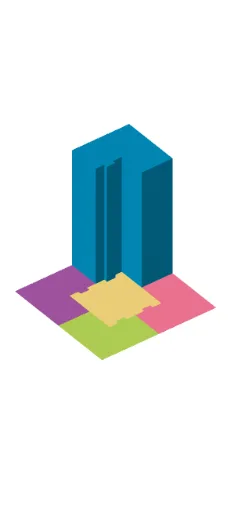
Loading the math board and drawing, please wait…
This example demonstrates the geometric construction of the MMC (Maximum Minimum Condition) problem. Key mathematical concepts include geometric construction, optimization, and linear programming. Using GeoGebra commands such as Point, Polygon, Midpoint, etc., users can intuitively understand how to find the optimal solution through geometric construction.
GeoGebra Commands & Parameters
Point(xAxis) → UPoint(xAxis) → VPolygon(U, V, 4) → pol6, n, p, b, h_1, W, ZMidpoint(n) → A_1OrthogonalLine(A_1, n) → i_1Midpoint(p) → B_1OrthogonalLine(B_1, i_1) → m_1Intersect(i_1, m_1) → C_1Circle(C_1, (sqrt(31) - 1) / 5) → c_1Intersect(c_1, m_1, 2) → D_1Intersect(c_1, i_1) → E_1, F_1Mirror(D_1, i_1) → G_1Line(D_1, i_1) → n_1Line(E_1, m_1) → p_1Intersect(n_1, p_1) → H_1Mirror(H_1, i_1) → I_1Mirror(I_1, m_1) → J_1Mirror(J_1, i_1) → K_1Midpoint(K_1, F_1) → L_1Line(K_1, J_1) → d_1Circle(L_1, 0.15) → e_1Intersect(e_1, d_1) → M_1, N_1OrthogonalLine(L_1, d_1) → f_2Circle(L_1, (4 - (4 * (sqrt(31) - 1) / 5)) / 3) → c_2Intersect(f_2, pol6) → O_1, P_1Intersect(c_2, f_2) → Q_1, R_1OrthogonalLine(Q_1, f_2) → i_2OrthogonalLine(M_1, d_1) → k_2OrthogonalLine(N_1, d_1) → n_2Intersect(i_2, k_2) → S_1Intersect(i_2, n_2) → V_1Intersect(h_1, m_1) → W_1Intersect(i_1, b) → Z_1Polygon(Z, W_1, D_1, K_1, M_1, S_1, V_1, N_1, F_1, Z_1) → pol4, z_1, i_3, w_1, t_2, a_2, b_2, d_2, v_1, e_2, h_3Mirror(Z, i_1) → Z'Mirror(W_1, i_1) → AMirror(D_1, i_1) → BMirror(K_1, i_1) → CMirror(M_1, i_1) → DMirror(S_1, i_1) → EMirror(V_1, i_1) → FMirror(N_1, i_1) → GMirror(F_1, i_1) → HMirror(Z_1, i_1) → IPolygon(Z', A, B, C, D, E, F, G, H, I) → pol5, z', i, a, b_1, c, d, e, f, g, hMirror(Z, m_1) → Z'_{1}Mirror(W_1, m_1) → JMirror(D_1, m_1) → KMirror(K_1, m_1) → LMirror(M_1, m_1) → MMirror(S_1, m_1) → NMirror(V_1, m_1) → OMirror(N_1, m_1) → PMirror(F_1, m_1) → QMirror(Z_1, m_1) → RPolygon(Z'_{1}, J, K, L, M, N, O, P, Q, R) → pol3, z'_{1}, r, j, k, l, m, n_3, o, p_2, qMirror(Z', m_1) → Z''Mirror(A, m_1) → A'Mirror(B, m_1) → B'Mirror(C, m_1) → C'Mirror(D, m_1) → D'Mirror(E, m_1) → E'Mirror(F, m_1) → F'Mirror(G, m_1) → G'Mirror(H, m_1) → H'Mirror(I, m_1) → I'Polygon(Z'', A', B', C', D', E', F', G', H', I') → pol2, z'', i', a', b', c', d', e', f', g', h'Polygon(K_1, H_1, I_1, J_1, D, E, F, G, N_1, V_1, S_1, M_1, M, N, O, P, G', F', E', D') → pol1, k_1, j_1, l_1, q_1, d_3, e_3, f_3, g_2, r_1, s_1, t_1, s, a_1, m_2, n_4, o_1, p_3, t, f_1, g_1Perimeter(pol2) → Perímetro_{pol2}Perimeter(pol1) → Perímetro_{pol1}Prism(pol3, n) → h_2, S, F_2, face1, face2, face3, face4, face5, face6, face7, face8, face9, T, face10, face11, aresta1, aresta2, aresta3, aresta4, aresta5, aresta6, aresta7, aresta8, T_1, aresta9, aresta10, aresta11, aresta12, aresta13, aresta14, aresta15, aresta16, aresta17, aresta18, U_1, aresta19, aresta20, A_2, B_2, C_2, D_2, E_2
AI Drawing Prompt Reference
Place two points on the x-axis and use them to form a square. Find the midpoint of one side and draw a perpendicular line through it; then take the midpoint of an adjacent side and draw a line perpendicular to that perpendicular, intersecting at a center point. Using this center, draw a circle with a specific radius, intersecting the perpendicular lines at several points. Through reflections and connections, construct a polygon from these points, then mirror it across a line to create a symmetric counterpart. The final figure shows a symmetric arrangement of circles, perpendicular lines, and polygons.
The prompt above was compiled from the original drawing commands and is for reference only.