
Median Line Construction
Loading the math board and drawing, please wait…
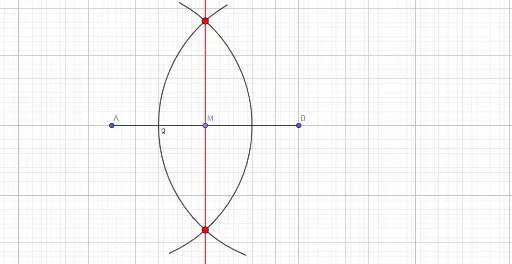
This example demonstrates the construction of a median line. It involves concepts such as midpoints, circles, circle arcs, intersections, and lines. Using GeoGebra commands like Segment, Point, Circle, CircleArc, Intersect, and Line, a median line can be constructed. Suitable for students at the junior high school level and above for geometric construction.
GeoGebra Commands & Parameters
Segment(A, B) → fPoint(f) → MCircle(A, 6) → cCircle(B, 6) → dPoint(d) → CPoint(d) → DPoint(c) → EPoint(c) → FCircleArc(A, F, E) → eCircleArc(B, C, D) → gIntersect(e, g, 1) → GIntersect(e, g, 2) → HLine(G, H) → h
AI Drawing Prompt Reference
Draw a horizontal segment and mark its midpoint. Using each endpoint as center, draw two congruent circles. On each circle, select two points and create circular arcs from each endpoint to its two chosen points, forming two symmetric arcs. These arcs intersect at two points; connect these intersections with a straight line, which is the median line.
The prompt above was compiled from the original drawing commands and is for reference only.