
Measuring Angles with Protractor by ewegner
Loading the math board and drawing, please wait…
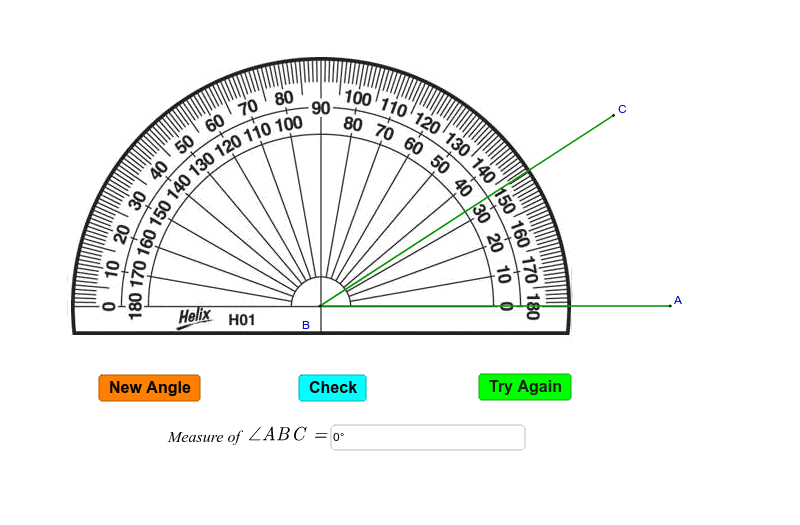
This example demonstrates how to measure any angle using a protractor. It involves core mathematical concepts like angle measurement, geometric construction, and geometric transformations. Key GeoGebra commands/objects used include Random, Intersect, Point, Rotate, Angle, Segment, Textfield, Corner, and LaTeX. Suitable for middle school students and above to learn and understand angle measurement methods, as well as for geometric teaching demonstrations.
GeoGebra Commands & Parameters
Random(10, 170) → nIntersect(xAxis, yAxis) → BPoint(xAxis) → ARotate(A, n°, B) → CAngle(A, B, C) → βSegment(A, B) → aSegment(B, C) → bTextfield(γ) → inputBox1Corner(5) → DLaTeX(D, true, true) → text4LaTeX(D, true, true) → text5
AI Drawing Prompt Reference
Draw an angle measurement diagram by first randomly selecting an angle n on the x-axis, then rotating point A on the x-axis counterclockwise by n degrees around the intersection point B of the y-axis and x-axis to get point C. Measure the size of angle ABC to get angle β, and draw line segments AB and BC. Finally, input a variable γ and display the degree of angle ABC in LaTeX format.
The prompt above was compiled from the original drawing commands and is for reference only.