
Maximize the Area of a Rectangle Inscribed in a Triangle
Loading the math board and drawing, please wait…
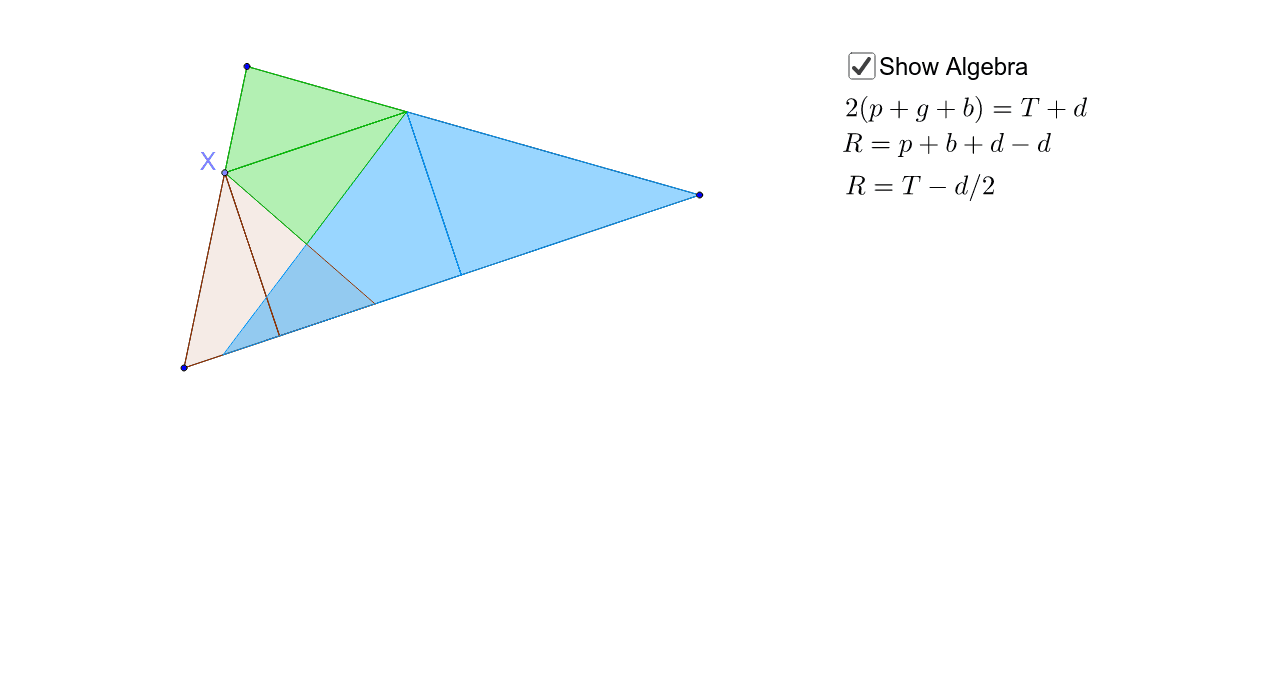
This example demonstrates how to inscribe a rectangle in a triangle to maximize its area. Key mathematical concepts include similarity transformation and triangle similarity. Using GeoGebra commands such as Segment, Point, Intersect, etc., a rectangle satisfying the condition can be constructed. Suitable for high school mathematics education and learning, especially for optimization problems.
GeoGebra Commands & Parameters
Segment(A, B) → aSegment(B, C) → bSegment(C, A) → cPoint(c) → XOrthogonalLine(X, a) → dOrthogonalLine(X, d) → eIntersect(e, b) → EOrthogonalLine(E, e) → fIntersect(d, a) → FIntersect(f, a) → GSegment(F, X) → gSegment(X, E) → hSegment(E, G) → iPolygon(A, F, X) → poly1, d_1, a_1, f_1Mirror(A, d) → A'Mirror(F, d) → F'Mirror(X, d) → D'Polygon(A', F', D') → poly1', d', a', f'Polygon(G, B, E) → poly2, e_1, g_1, b_1Mirror(G, f) → G'Mirror(B, f) → B'Mirror(E, f) → E'Polygon(G', B', E') → poly2', e', g', b'Polygon(X, E, C) → poly3, c_1, d_2, e_2Mirror(X, e) → D'_1Mirror(E, e) → E'_1Mirror(C, e) → C'Polygon(D'_1, E'_1, C') → poly3', c', d'_1, e'_1Line(C, e) → j
AI Drawing Prompt Reference
Draw a triangle ABC, and then inscribe a rectangle inside it to maximize its area, with one side of the rectangle parallel to one side of the triangle. First, draw the three sides of the triangle, then use perpendicular lines and intersections to find the vertices of the rectangle.
The prompt above was compiled from the original drawing commands and is for reference only.