
Maximize Area Given Perimeter
Loading the math board and drawing, please wait…
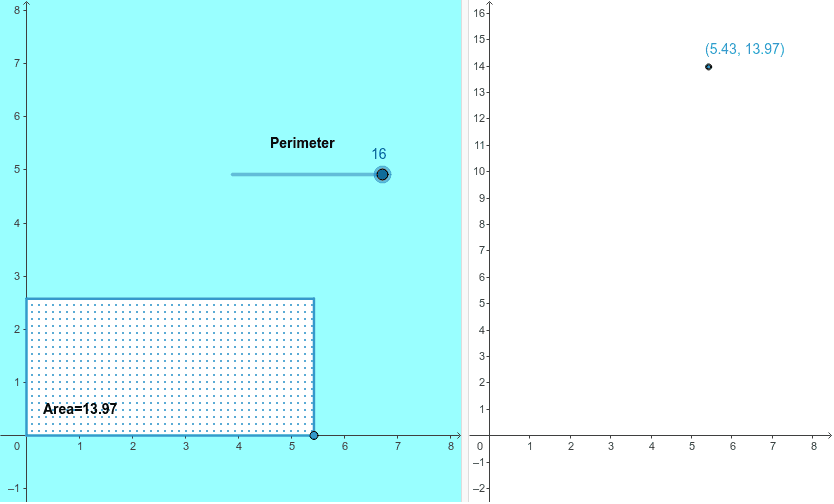
This example demonstrates how to maximize the area of a shape under a fixed perimeter using geometric and calculus concepts. Key mathematical ideas include the area formula for triangles, the relationship between circumference and area of circles, and optimization through calculus. Construction involves using GeoGebra commands like Segment, Circle, Polygon, Distance, and Area to visualize and calculate. Suitable for high school students or college freshmen learning geometry and calculus fundamentals, or for introductory mathematical modeling.
GeoGebra Commands & Parameters
Segment((0, 0), (p / 2, 0)) → qPoint(q) → COrthogonalLine(C, xAxis) → nDistance(D, C) → dCircle(D, p / 2 - d) → cIntersect(c, yAxis) → A, BOrthogonalLine(B, yAxis) → aOrthogonalLine(C, xAxis) → bIntersect(a, b) → EPolygon(D, C, E, B) → poly1, e, f, g, h
AI Drawing Prompt Reference
Draw a shape to demonstrate maximizing area under a fixed perimeter. Start with a horizontal segment, then draw a circle above its midpoint with a radius equal to half the perimeter minus half the segment's length. Connect the intersection points of the circle with a vertical line to form a quadrilateral, which represents the shape with maximum area for the given perimeter.
The prompt above was compiled from the original drawing commands and is for reference only.