
Circle Area Calculation by user17128
Loading the math board and drawing, please wait…
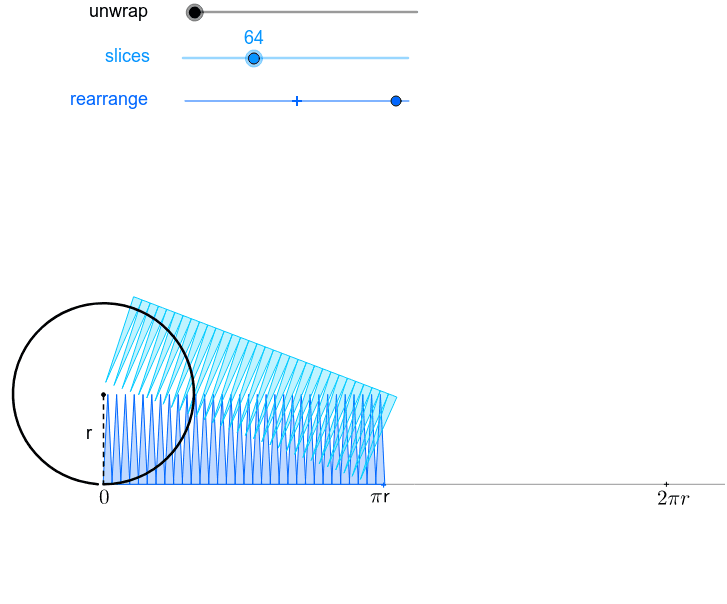
This example demonstrates how to calculate the area of a circle through dynamic visualization; involves core math concepts like circle, area, coordinate geometry, and trigonometry; constructed using commands/objects such as Segment, Point, Min, Sequence, Max, Rotate, Sector, Arc, CurveCartesian, Circle, Ray, Midpoint, Intersect, CircleArc; suitable for high school mathematics teaching and geometric construction learning.
GeoGebra Commands & Parameters
Segment(E, (x(E) + 2.5, y(E))) → aPoint(a) → FMin((x(F) - x(E)) / (a / 2), 1) → kPoint(yAxis) → OSequence(If[k < 1, (x(O) + ((l * sin((i * φ))) * cos((i * φ)) / sin(φ)), y(O) + ((l * sin((i * φ))) * sin((i * φ)) / sin(φ))), (x(O) + (l * i), y(O))], i, 0, (2 * n)) → list2Sequence((x(O) + sin((i * θ)), y(O) + 1 - cos((i * θ))), i, 0, (2 * n)) → list1Max((x(F) - x(E)) / (a / 2) - 1, 0) → k'Rotate((x(O) + 0, y(O) + 1), ((-k) * θ / 2), O) → ARotate(O, ((-k) * θ / 2), O) → O'Rotate(Element[list1, 1], ((-k) * θ / 2), O) → BSector(Rotate[Circle[(x(O) + 0, y(O) + 1), O], ((-k) * θ / 2), O], Rotate[O, ((-k) * θ / 2), O], Rotate[Element[list1, 1], ((-k) * θ / 2), O]) → cRotate((x(O) + 0, y(O) + 1), ((-k) * θ / 2), O) → CRotate(O, ((-k) * θ / 2), O) → O'_1Rotate(Element[list1, 1], ((-k) * θ / 2), O) → DArc(Rotate[Circle[(x(O) + 0, y(O) + 1), O], ((-k) * θ / 2), O], O'_1, D) → dCurveCartesian(t - sin(t), 1 - cos(t), t, 0, 6.28319) → bCircle((0, 1), 1) → hRay((0, 0), (1, 0)) → iPoint(Segment[(0, 1), (6.28319, 1)]) → HSegment(H, (x(H), 0)) → jMidpoint(j) → IMidpoint(a) → JCircle(L, 1 / (1 - m)) → pCircle((0, 0), 1 / (1 - m)) → qIntersect(p, q, 1) → MCircle((0, 1), 1) → c_1Segment((0, 0), (6.283185307179586, 0)) → eSegment(G, (x(G), y(G) - 1)) → rSequence(Sector[Rotate[Translate[Circle[(x(O) + 0, y(O) + 1), Element[list1, i]], Vector[Element[list1, i], Element[list2, i]]], (((-((2 * i) - 1)) * k) * θ / 2), Element[list2, i]], Rotate[Translate[Element[list1, i], Vector[Element[list1, i], Element[list2, i]]], (((-((2 * i) - 1)) * k) * θ / 2), Element[list2, i]], Rotate[Translate[Element[list1, i + 1], Vector[Element[list1, i], Element[list2, i]]], (((-((2 * i) - 1)) * k) * θ / 2), Element[list2, i]]], i, 1, n) → list3Sequence(Sector[Rotate[Rotate[Translate[Circle[(x(O) + 0, y(O) + 1), Element[list1, i]], Vector[Element[list1, i], Element[list2, i]]], (((-((2 * i) - 1)) * k) * θ / 2), Element[list2, i]], (180° * k'), (x(O) + (n * l) - sin(θ / 2) / 2, y(O) + cos(θ / 2) / 2)], Rotate[Rotate[Translate[Element[list1, i], Vector[Element[list1, i], Element[list2, i]]], (((-((2 * i) - 1)) * k) * θ / 2), Element[list2, i]], (180° * k'), (x(O) + (n * l) - sin(θ / 2) / 2, y(O) + cos(θ / 2) / 2)], Rotate[Rotate[Translate[Element[list1, i + 1], Vector[Element[list1, i], Element[list2, i]]], (((-((2 * i) - 1)) * k) * θ / 2), Element[list2, i]], (180° * k'), (x(O) + (n * l) - sin(θ / 2) / 2, y(O) + cos(θ / 2) / 2)]], i, n + 1, (2 * n)) → list4CircleArc((0, 1 / (1 - m)), O, L) → sPoint(e) → NSegment(E_1, (x(E_1) + 3, y(E_1))) → a_1Point(a_1) → F_1Midpoint(a_1) → J_1Point(e) → Q
AI Drawing Prompt Reference
Draw a circle with center at (0,1) and radius 1. Then draw a horizontal segment from the center to (6.28319,1), and draw a vertical segment from this point downwards. Construct an arc with the center at the circle's center and the radius equal to the segment length. Next, draw a horizontal ray from the origin, and a circle that is tangent to the original circle with radius 1/(1-m). Finally, construct an arc with center at (0,1), starting at point O, and ending at point L.
The prompt above was compiled from the original drawing commands and is for reference only.