
Max Rectangle in Ellipse
Loading the math board and drawing, please wait…
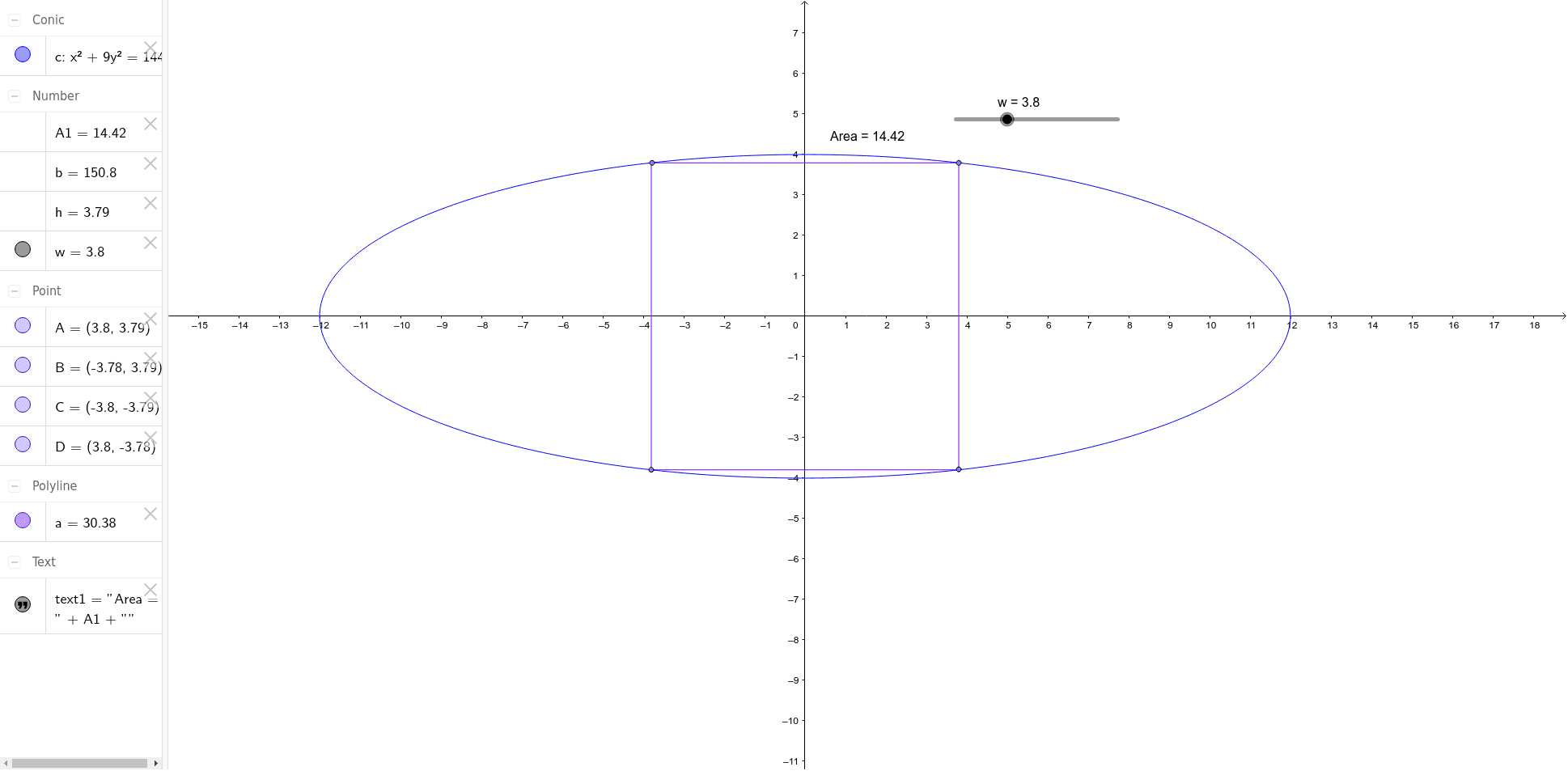
This example demonstrates how the area of a rectangle changes as it varies within an ellipse. Key mathematical concepts include ellipses, rectangles, and coordinate geometry. Using GeoGebra commands such as Conic, PolyLine, Area, and Point, the construction of the rectangle's variation within the ellipse is illustrated. Suitable for high school mathematics education and learning.
GeoGebra Commands & Parameters
Conic({16, 144, -2304, 0, 0, 0}) → cPolyLine((w, h), ((-w), h), ((-w), (-h)), (w, (-h)), (w, h)) → aArea(c) → bPoint(a) → APoint(a) → BPoint(a) → CPoint(a) → D
AI Drawing Prompt Reference
Draw an ellipse centered at the origin with its major axis horizontal and minor axis vertical. Inside the ellipse, place a dynamic rectangle whose four vertices always lie on the ellipse, with sides parallel to the coordinate axes. As the rectangle varies within the ellipse, its area changes. Outline the rectangle with lines and mark its four vertices. Also compute and display the area of the ellipse and the area of the rectangle to visually compare their sizes.
The prompt above was compiled from the original drawing commands and is for reference only.