
Maria's Spiral Art: Dynamic Geometry with Parallelograms and Perpendiculars
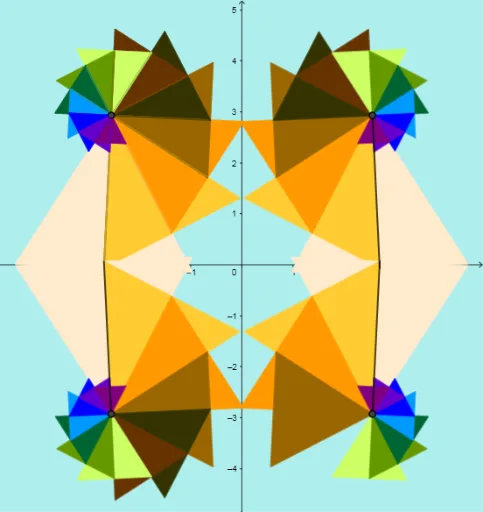
Loading the math board and drawing, please wait…
In collections
EQUILATERAL TRIANGLE SPIRAL
① This example demonstrates how to create a spiral-like artistic pattern by repeatedly constructing parallelograms, perpendicular lines, intersections, and mirror images, resulting in a layered composition of polygons. ② Core mathematical concepts include parallelogram properties, perpendicular (orthogonal) lines, intersection points, mirror transformations, with implicit connections to the Pythagorean theorem and trigonometry as indicated by the original tags. ③ Construction highlights: from the summary, GeoGebra commands such as Polygon, OrthogonalLine, Intersect, Segment, and Mirror are used, sequentially defining objects A, B, poly1, f, g, h, C, i, D, E, j, poly2, k, l, m, F, n, G, H, poly3, p, q, r, I, J, poly4, s, t, a, K, L, poly5, b, c, d, M, N, poly6, e, f_1, building up the spiral structure iteratively. ④ Suitable for middle or high school geometry classes or mathematical art projects, this example helps explore composite geometric transformations and can serve as an engaging dynamic demonstration to spark interest in shape structure and symmetry.
GeoGebra Commands & Parameters
Polygon(A, B, 3) → poly1, f, g, h, COrthogonalLine(C, f) → iIntersect(i, poly1) → D, ESegment(C, D) → jPolygon(C, D, 3) → poly2, k, l, m, FOrthogonalLine(F, j) → nIntersect(j, k) → GIntersect(g, l) → HPolygon(C, H, 3) → poly3, p, q, r, IIntersect(q, m) → JPolygon(C, J, 3) → poly4, s, t, a, KIntersect(r, t) → LPolygon(C, L, 3) → poly5, b, c, d, MIntersect(a, c) → NPolygon(C, N, 3) → poly6, e, f_1, g_1, OIntersect(d, f_1) → PPolygon(C, P, 3) → poly7, h_1, i_1, j_1, QIntersect(i_1, g_1) → RPolygon(C, R, 3) → poly8, k_1, l_1, m_1, SIntersect(l_1, j_1) → TPolygon(C, T, 3) → poly9, n_1, p_1, q_1, UIntersect(m_1, p_1) → VPolygon(C, V, 3) → poly10, r_1, s_1, t_1, WIntersect(s_1, poly9) → Z, Z_1Polygon(C, Z_1, 3) → poly11, a_1, b_1, c_1, A_1Intersect(t_1, poly11) → B_1, C_1Polygon(C_1, B_1, 3) → poly12, d_1, e_1, f_2, D_1Intersect(c_1, e_1) → E_1Polygon(C_1, E_1, 3) → poly13, g_2, h_2, i_2, F_1Mirror(poly1, yAxis) → poly1'Mirror(poly2, yAxis) → poly2'Mirror(poly3, yAxis) → poly3'Mirror(poly4, yAxis) → poly4'Mirror(poly5, yAxis) → poly5'Mirror(poly6, yAxis) → poly6'Mirror(poly7, yAxis) → poly7'Mirror(poly8, yAxis) → poly8'Mirror(poly9, yAxis) → poly9'Mirror(poly10, yAxis) → poly10'Mirror(C, yAxis) → C'Mirror(D, yAxis) → D'Segment(C', D') → j'Mirror(E, yAxis) → E'Mirror(Z, yAxis) → Z'Mirror(poly11, yAxis) → poly11'Mirror(poly12, yAxis) → poly12'Mirror(poly13, yAxis) → poly13'Mirror(poly1, xAxis) → poly1'_1Mirror(poly2, xAxis) → poly2'_1Mirror(poly3, xAxis) → poly3'_1Mirror(poly4, xAxis) → poly4'_1Mirror(poly5, xAxis) → poly5'_1Mirror(poly6, xAxis) → poly6'_1Mirror(poly7, xAxis) → poly7'_1Mirror(poly8, xAxis) → poly8'_1Mirror(poly9, xAxis) → poly9'_1Mirror(poly10, xAxis) → poly10'_1Mirror(C, xAxis) → C'_1Mirror(D, xAxis) → D'_1Segment(C'_1, D'_1) → j'_1Mirror(E, xAxis) → E'_1Mirror(Z, xAxis) → Z'_1Mirror(poly11, xAxis) → poly11'_1Mirror(poly12, xAxis) → poly12'_1Mirror(poly13, xAxis) → poly13'_1Mirror(poly1', xAxis) → poly1''Mirror(poly2', xAxis) → poly2''Mirror(poly3', xAxis) → poly3''Mirror(poly4', xAxis) → poly4''Mirror(poly7', xAxis) → poly7''Mirror(poly8', xAxis) → poly8''Mirror(poly9', xAxis) → poly9''Mirror(poly10', xAxis) → poly10''Mirror(poly11', xAxis) → poly11''Mirror(poly12', xAxis) → poly12''Mirror(poly13', xAxis) → poly13''Mirror(C', xAxis) → C''Mirror(D', xAxis) → D''Segment(C'', D'') → j''Mirror(E', xAxis) → E''Mirror(Z', xAxis) → Z''
AI Drawing Prompt Reference
Start with a segment and construct an equilateral triangle. Using one vertex of this triangle as a common point, repeatedly build new equilateral triangles outward, each sharing a side with the previous one and oriented so that a perpendicular line from the common point intersects the previous triangle to determine the next vertex. Continue this process to create a spiral chain of triangles. Finally, mirror the entire chain across the vertical axis, then mirror the result across the horizontal axis, producing a symmetric spiral art pattern.
The prompt above was compiled from the original drawing commands and is for reference only.