
Magic Point 13: Slider‑Controlled Point Movement Along a Segment
Loading the math board and drawing, please wait…
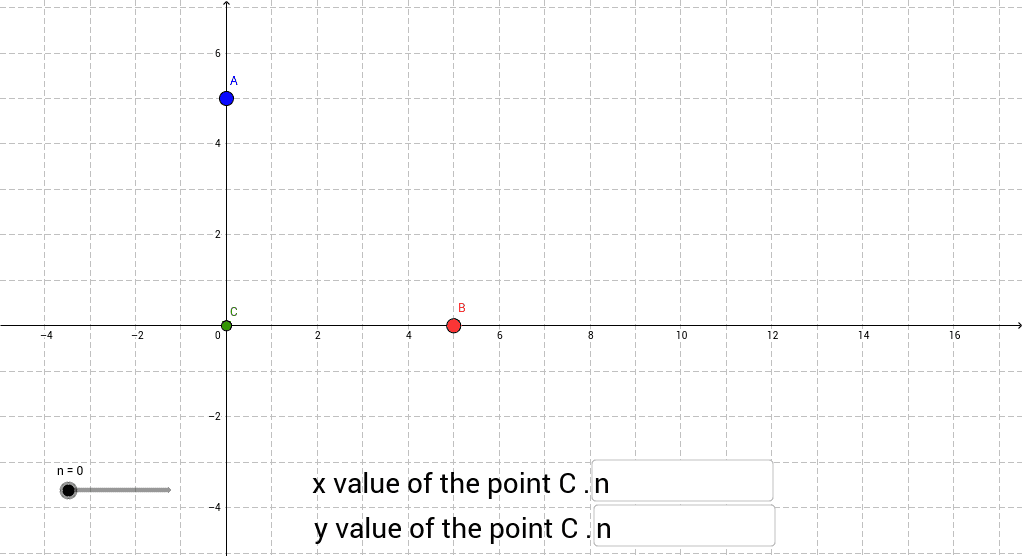
This GeoGebra worksheet demonstrates a point moving along a straight segment AB under user control. A slider adjusts the point’s coordinate definitions, allowing learners to see linear interpolation in real time. Core concepts covered include coordinate geometry, parametric representation of a line, basic arithmetic operations, and the use of functions to define points. Construction details: the applet uses the Textfield and If commands to build interactive input boxes (inputBox1 and inputBox2) for entering coordinate parameters a and b, a slider n to set the interpolation factor, and objects A, B, and C where C is computed as C=(1‑n)A+nB, showing continuous motion along AB. Additional variables c are displayed via inputBox2 for extra feedback. The activity is suitable for middle‑ and high‑school students learning about lines, functions, and GeoGebra basics, as well as teachers looking for an interactive demonstration of parametric motion.
GeoGebra Commands & Parameters
Textfield(a) → inputBox1Textfield(b) → inputBox2If(b > 0, 0 * n + b, b) → c