
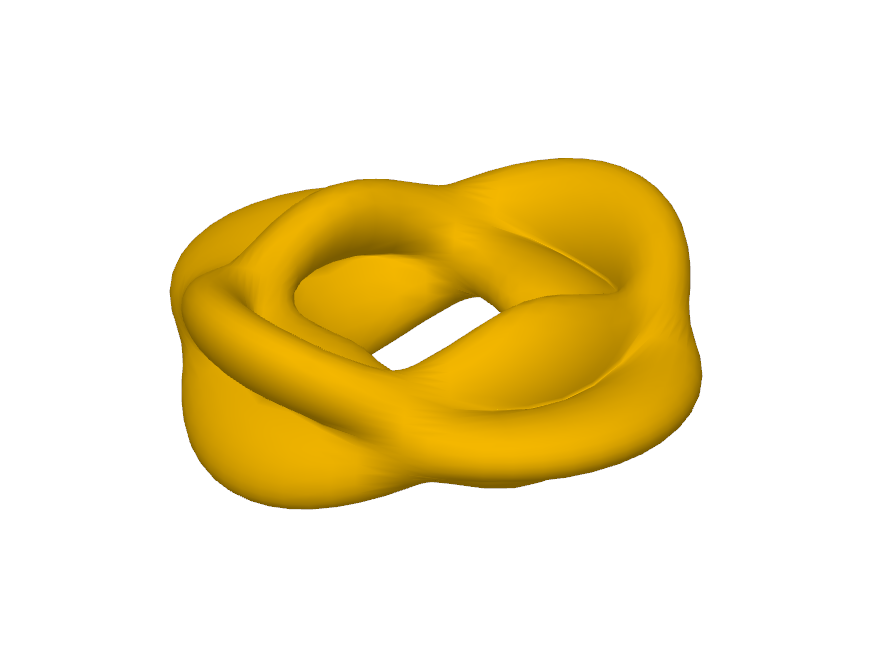
Lumpy Torus and its Sublevel Sets
Loading the math board and drawing, please wait…
This example demonstrates sublevel sets on a torus surface, akin to a height function on a curved surface. Key mathematical concepts include surface geometry, sublevel sets, and function analysis. Construction involves GeoGebra commands like Flatten, Surface, Join, and Sequence. Suitable for high school students or early university students learning geometry and function relationships.
GeoGebra Commands & Parameters
Flatten(Sequence[Sequence[(((4 * k) + 1) / 8, ((2 * n) + 1) / 6), k, 0, 1], n, 0, 2]) → list1Surface((cos(((2 * π) * t)) * (4 + (cos(((2 * π) * s)) * (r + (a * f(t, s)))))), (sin(((2 * π) * t)) * (4 + (cos(((2 * π) * s)) * (r + (a * f(t, s)))))), (sin(((2 * π) * s)) * (r + (a * f(t, s)))), t, 0, 1, s, 0, 1) → bFlatten(Sequence[Sequence[(((4 * k) + 3) / 8, ((2 * n) + 2) / 6), k, 0, 1], n, 0, 2]) → list3Join({list1, list3}) → list4Sequence(Surface[(cos(((2 * π) * t)) * (4 + (cos(((2 * π) * s)) * (r + (a * f(t, s)))))), (sin(((2 * π) * t)) * (4 + (cos(((2 * π) * s)) * (r + (a * f(t, s)))))), (sin(((2 * π) * s)) * (r + (a * f(t, s)))), t, x(Element[list4, i]) - ((c + 1) * ε), x(Element[list4, i]) + ((c + 1) * ε), s, y(Element[list4, i]) - ((2 * (c + 1)) * ε / 3), y(Element[list4, i]) + ((2 * (c + 1)) * ε / 3)], i, 1, 12) → list2
AI Drawing Prompt Reference
Draw a lumpy torus and demonstrate its sublevel sets by adjusting parameters. Start by creating a parameterized torus, then generate a series of height-changing sublevel sets, and finally connect these sublevel sets to the torus to form a complex geometric structure.
The prompt above was compiled from the original drawing commands and is for reference only.