
Logarithmic Functions Comparison
Loading the math board and drawing, please wait…
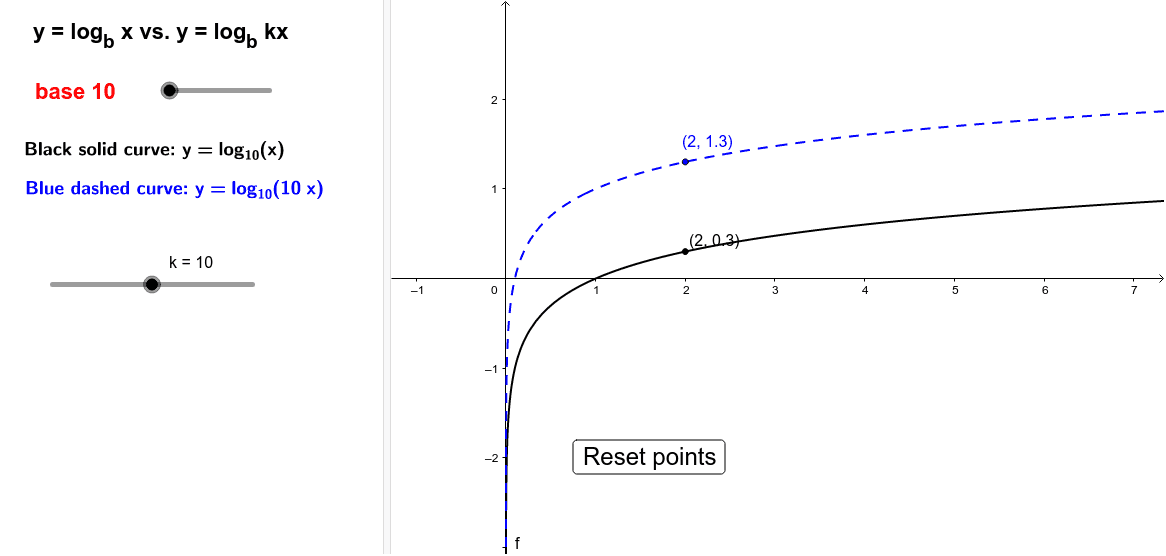
This example demonstrates the comparison of log(x) and log(10x). Key mathematical concepts include logarithmic functions and their properties. Using GeoGebra commands such as If, Point, and Function, you can dynamically adjust parameters to observe changes in the graphs. Suitable for high school mathematics education and learning.
GeoGebra Commands & Parameters
If(a ≟ 1, log(10, x), If[a ≟ 2, log(x), log(b, x)]) → fIf(bb, -1, 1) → k_1If(a ≟ 1, log(10, (k * x)), If[a ≟ 2, log((k * x)), log(b, (k * x))]) → gIf(bb, log(0.1, x), lg(x)) → pIf(bb, log(1 / ℯ, x), log(x)) → hIf(bb, logText, lnText) → text8If(a ≠ 2, b, 2.71828) → base01Point(f) → C
AI Drawing Prompt Reference
Draw the graphs of log(x) and log(10x), and observe their changes by adjusting parameters a and b. First, draw the graphs of log(10, x) and log(10, 10x), then adjust to log(x) or log(10x) based on the value of a, and draw the graphs of log(b, x) and log(b, 10x). Set k to 1 or -1, and draw the graphs of log(k * x) and log(b, k * x). Finally, draw the graphs of log(0.1, x) and lg(x), and display the text for natural logarithm and common logarithm.
The prompt above was compiled from the original drawing commands and is for reference only.