
Locus of a Moving Point and a Fixed Line Segment
Loading the math board and drawing, please wait…
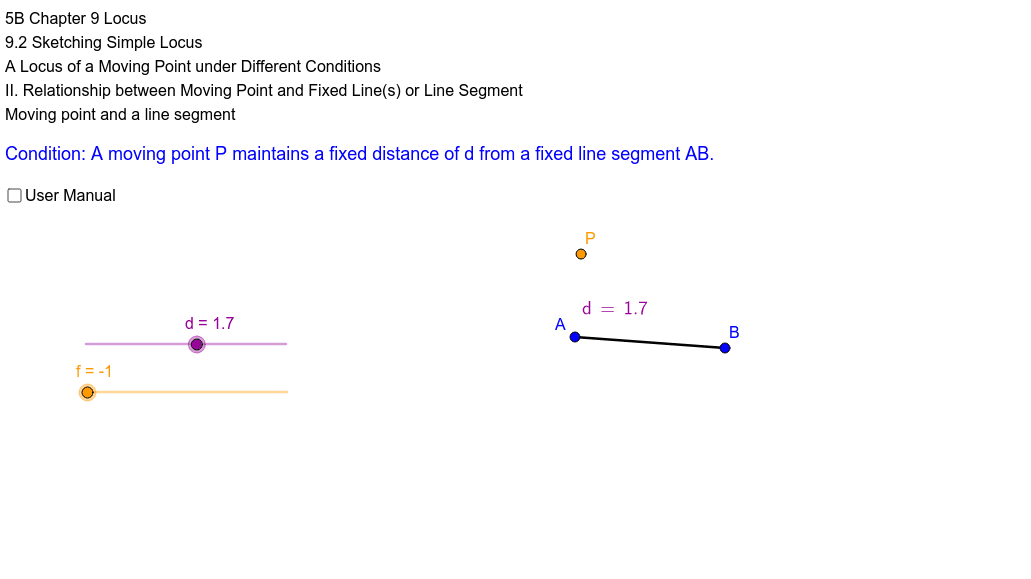
This example demonstrates the locus of a moving point and a fixed line segment. Key mathematical concepts include geometric construction, locus, distance, and circle. Using GeoGebra commands such as Segment, OrthogonalLine, Distance, and Circle, the construction of the locus is achieved. Suitable for middle school and above students or teachers for teaching purposes.
GeoGebra Commands & Parameters
Segment(A, B) → aOrthogonalLine(A, a) → bDistance((1, 0), (2, 0)) → eOrthogonalLine(C, a) → rCircle(C, d) → qIntersect(q, r) → P', PCircle(A, d) → gOrthogonalLine(A, a) → iIntersect(g, i) → E, FCircle(B, d) → kOrthogonalLine(B, a) → lIntersect(k, l) → H, ISegment(F, I) → mSemicircle(I, H) → pSegment(H, P') → nSegment(F, P) → jSemicircle(E, F) → sDistance(P', a) → distanceP'aDistance(P', a) → hDistance(P, a) → distancePa
AI Drawing Prompt Reference
Draw a fixed line segment and its perpendicular bisector. With the midpoint as the center, draw a circle intersecting the perpendicular bisector at two points. Similarly, draw circles centered at the endpoints with the same radius, intersecting the perpendicular bisector at two more points. Connect these intersection points and draw a semicircle between them. Finally, connect the endpoints to the intersection points on the circle and draw semicircles at both endpoints.
The prompt above was compiled from the original drawing commands and is for reference only.