
Linking Normal Probability Plots to CDF Probability Scales
Loading the math board and drawing, please wait…
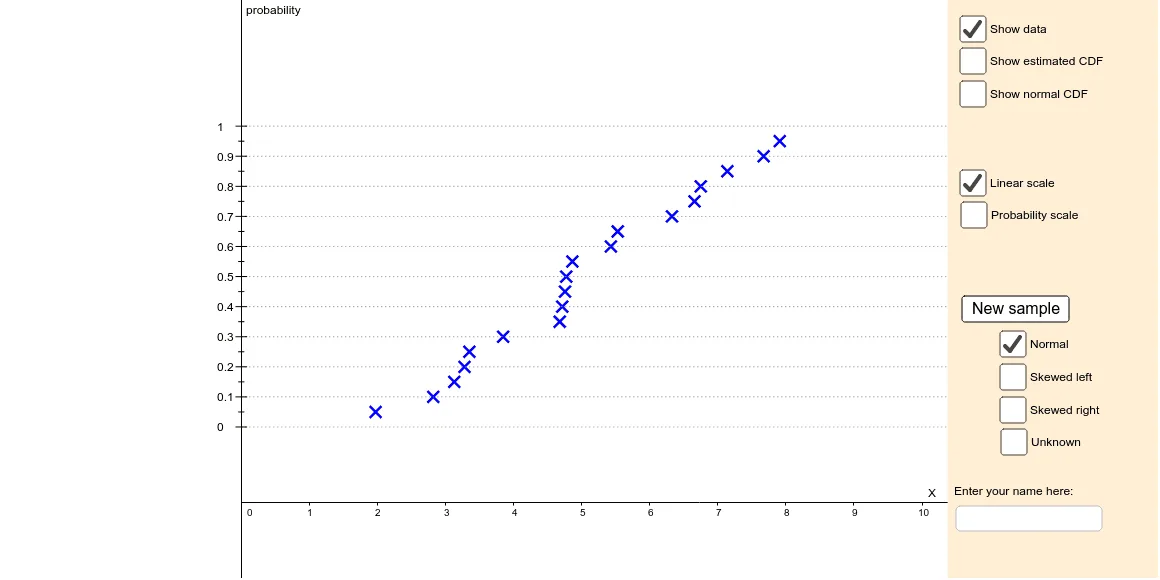
This applet demonstrates the visual relationship between a CDF probability plot (including an animated/transitioning vertical quantile scale) and a Normal probability plot. It highlights how theoretical Normal quantiles correspond to empirical quantiles derived from sample data, making it easier to judge whether the data follow an approximately Normal distribution. Key concepts include the Normal CDF, probability/quantile scales, empirical distribution (ogive-style cumulative curves), and parameterization of the Normal model using the sample mean and sample standard deviation. Construction-wise, the GeoGebra setup uses Sequence, Normal, Sort, and Join to generate and order theoretical quantile points, then Mean and SampleSD to estimate parameters (xbar, s). Conditional logic via If is used for data handling, while Translate and the internal coordinate/scale objects (probscale, linscale/scalept, ycoords variants) implement the mapping between CDF-style axes and probability-plot coordinates. Core graphic objects include normcdf and the collection of points for curves (ogive, ogivePoints, normpdfpoints), along with PolyLine/Polygon/Line/Segment for constructing cumulative and quantile lines, and Textfield/text labels (text1, text2) for clarifying the probabilistic scales. Suitable for high-school/undergraduate probability & statistics and practical data analysis demonstrations, especially for teaching Normality assessment and probability plot interpretation.
GeoGebra Commands & Parameters
Sequence(RandomUniform[0, 10], i, 1, 19) → dataunifSequence(10 - InverseChiSquared[3, RandomUniform[0, 1]], i, 1, 19) → dataleftSequence(RandomNormal[5, 2], i, 1, 19) → datanormSequence(InverseChiSquared[3, RandomUniform[0, 1]], i, 1, 19) → datarightNormal(0.5, 1 / ((2 * InverseNormal[0, 1, scalept])), x) → normfSort(If[skewleft, dataleft, If[skewright, dataright, If[norm, datanorm, dataunif]]]) → dataTranslate(Rotate[Sequence[(xx, (2 * normf(xx))), xx, -3, 3, 0.05], 1.5708], (axescross - normoffset, 0)) → normpdfpointsMean(data) → xbarSampleSD(data) → sIf(probscale, t2, 1 - t2) → tSequence((0.05 * i), i, 0, 20) → ycoords1Zip(If[yy ≟ 0, -3, If[yy ≟ 1, 3, InverseNormal[0, 1, yy] / ((2 * InverseNormal[0, 1, scalept])) + 0.5]], yy, ycoords1) → ycoords2Zip(((1 - t) * aa) + (t * bb), aa, ycoords1, bb, ycoords2) → ycoordsSequence((Element[data, i], Element[ycoords, i + 2]), i, 1, 9) → altPointsJoin(Sequence[{(Element[data, i], Element[ycoords, i + 1]), (Element[data, i + 1], Element[ycoords, i + 1])}, i, 1, 19]) → ogivePointsPolyLine(ogivePoints) → ogiveZip(((1 - t) * yy) + (t * (InverseNormal[0, 1, yy] / ((2 * InverseNormal[0, 1, scalept])) + 0.5)), yy, Sequence[(0.1 * i) + 0.05, i, 0, 9]) → altycoordsPolygon({Corner[2], Corner[3], (x(Corner[3]) - (x(Corner[3]) - x(Corner[4])) / 5.5, y(Corner[3])), (x(Corner[2]) - (x(Corner[2]) - x(Corner[1])) / 5.5, y(Corner[2]))}) → fillerLine(normlineP1, normlineP2) → normdraglinePolygon(Join[{KeepIf[y(P) < y(normlineP1), P, normpdfpoints], {(axescross - (2 * normf(y(normlineP1))) - normoffset, y(normlineP1)), (axescross - normoffset, y(normlineP1))}}]) → normareaPolyLine(normpdfpoints) → normpdfSegment((0, -0.27), (0, -0.23)) → zerotickSequence((Element[data, i], Element[ycoords, i + 1]), i, 1, 19) → dataPointsSequence(Ray[(axescross, Element[ycoords, i]), (1, Element[ycoords, i])], i, 1, 21, 2) → gridlinesSequence(Text[zz, (axescross - normoffset + 0.06, zz / ((2 * InverseNormal[0, 1, scalept])) + 0.49)], zz, -3, 3) → zlabelsSegment((axescross - normoffset, y(normlineP1)), (axescross, y(normlineP1))) → normsegmentSequence(Segment[(axescross - normoffset - 0.04, zz / ((2 * InverseNormal[0, 1, scalept])) + 0.5), (axescross - normoffset + 0.04, zz / ((2 * InverseNormal[0, 1, scalept])) + 0.5)], zz, -3, 3) → zticksSequence(Segment[(axescross - 0.08, Element[ycoords, i]), (axescross + 0.08, Element[ycoords, i])], i, 1, 21, 2) → tickmarksSequence(Text[Element[ycoords1, i], (axescross - 0.36, Element[ycoords, i] - 0.015)], i, 1, 21, 2) → ticklabelsZip(Segment[(axescross - 0.04, yy), (axescross + 0.04, yy)], yy, altycoords) → alttickmarksTextfield() → inputBox1
AI Drawing Prompt Reference
Create a visual representation showing the relationship between a Normal probability plot and a CDF probability plot. Include an animated vertical quantile scale transitioning between the two plots. The graph should feature sequence-generated theoretical quantile points and parameterization using sample mean and standard deviation for the Normal model. Key elements are the Normal distribution curve, empirical cumulative distribution curve (ogive-style), quantile lines, and probability scale text labels, all interconnected through coordinate mapping.
The prompt above was compiled from the original drawing commands and is for reference only.