
Lines of Symmetry Investigation: Mirror Symmetry in Polygons and Circles
Loading the math board and drawing, please wait…
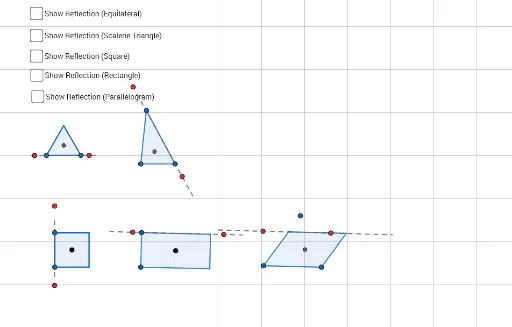
This GeoGebra example dynamically explores the lines of symmetry of polygons and associated circles (incircle, circumcircle). It demonstrates axial symmetry, reflection, angle bisectors, perpendicular bisectors, and how symmetry axes relate to vertices, edges, and centers. Construction uses commands: Polygon, OrthogonalLine, LineBisector, AngularBisector, Mirror, Intersect, Circle, Segment, Length, Midpoint, Point. Users can drag vertices or adjust sliders to observe changes in the number and position of symmetry lines. Suitable for middle and high school students learning geometric transformations and symmetry, and for teachers to illustrate concepts in class.
GeoGebra Commands & Parameters
Polygon(A, B, 3) → poly1, f, g, h, COrthogonalLine(C, f) → iOrthogonalLine(A, g) → jIntersect(i, j) → DLine(E, F) → kCircle(D, Segment[A, B]) → cIntersect(c, k, 1) → GIntersect(c, k, 2) → HSegment(H, G) → lMirror(poly1, l) → poly1'Polygon(I, J, K) → t1, k_1, i_1, j_1AngularBisector(J, I, K) → mAngularBisector(I, K, J) → nIntersect(m, n) → LLength(i_1) → aLength(j_1) → bLength(k_1) → dCircle(L, Max[a, Max[b, d]]) → eLine(M, N) → pIntersect(e, p, 1) → OIntersect(e, p, 2) → PSegment(O, P) → qMirror(I, q) → I'Mirror(J, q) → J'Mirror(K, q) → K'Polygon(I', J', K') → t1', k', i', j'Polygon(Q, R, 4) → poly2, s, t, f_1, g_1, S, TMidpoint(Q, T) → UMidpoint(T, S) → VOrthogonalLine(U, g_1) → h_1OrthogonalLine(V, f_1) → l_1Point(l_1) → WCircle(W, Segment[R, Q]) → c_1Line(Z, A_1) → m_1Intersect(c_1, m_1, 1) → B_1Intersect(c_1, m_1, 2) → C_1Segment(B_1, C_1) → n_1Mirror(poly2, n_1) → poly2'Segment(D_1, E_1) → p_1OrthogonalLine(E_1, p_1) → q_1Circle(E_1, Segment[E_1, D_1]) → d_1Intersect(d_1, q_1, 2) → F_1Circle(F_1, Segment[E_1, D_1]) → e_1Intersect(e_1, q_1, 2) → G_1OrthogonalLine(G_1, q_1) → r_1OrthogonalLine(D_1, p_1) → s_1Intersect(r_1, s_1) → H_1Polygon(E_1, G_1, H_1, D_1) → q1, e_2, g_2, h_2, d_2LineBisector(D_1, E_1) → t_1LineBisector(e_2) → a_1Point(t_1) → I_1Circle(I_1, e_2) → c_2Line(J_1, K_1) → b_1Intersect(c_2, b_1, 1) → L_1Intersect(c_2, b_1, 2) → M_1Segment(L_1, M_1) → f_2Segment(L_1, M_1) → i_2Mirror(E_1, i_2) → N_1Mirror(G_1, i_2) → O_1Mirror(H_1, i_2) → P_1Mirror(D_1, i_2) → Q_1Polygon(N_1, O_1, P_1, Q_1) → q1', n_2, o_1, p_2, q_2Line(R_1, e_2) → j_2OrthogonalLine(R_1, j_2) → k_2Circle(R_1, Segment[E_1, D_1]) → r_2Intersect(r_2, k_2, 2) → T_1Line(T_1, j_2) → l_2Line(R_1, S_1) → m_2Point(j_2) → U_1Line(U_1, m_2) → s_2Intersect(l_2, s_2) → V_1Intersect(l_2, m_2) → W_1Polygon(V_1, W_1, R_1, U_1) → q2, v_1, w_1, r_3, u_1Midpoint(W_1, U_1) → Z_1Circle(Z_1, Segment[R_1, V_1]) → t_2Line(A_2, B_2) → a_2Intersect(t_2, a_2, 2) → C_2Intersect(t_2, a_2, 1) → D_2Segment(C_2, D_2) → b_2Mirror(V_1, b_2) → E_2Mirror(W_1, b_2) → F_2Mirror(R_1, b_2) → G_2Mirror(U_1, b_2) → H_2Polygon(E_2, F_2, G_2, H_2) → q2', e_3, f_3, g_3, h_3