
Linear Functions & Yellow Bowties: Dynamic Geometry Exploration
Loading the math board and drawing, please wait…
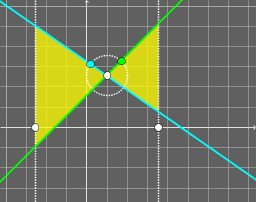
①This GeoGebra example demonstrates the interplay between linear function graphs and a 'yellow bowtie' shape constructed from polygons, showing how algebraic functions and geometric figures can be linked dynamically. ②Core mathematical concepts include linear functions (first-degree equations), similar triangles, polygon area calculation, and logical reasoning about geometric relationships. ③Construction: Based on the summary, the commands used are Point, Circle, Line, Intersect, and Polygon, creating objects A, B, C, D, E, F, G, H, I, lines (a,b,c,d,e,f,g,h), circles (c_1,c_2), polygons (poly1,poly2), and an area object. The bowtie is built via intersections and connecting lines, with linear functions controlling its position or shape. ④Suitable for middle and high school students learning the integration of functions and geometry, and for teachers demonstrating the connection between algebraic graphs and geometric constructions in a dynamic environment.
GeoGebra Commands & Parameters
Point(xAxis) → APoint(xAxis) → BCircle(C, 1) → cPoint(c) → DPoint(c) → ELine(C, E) → dLine(C, D) → eIntersect(a, d) → FIntersect(a, e) → GIntersect(b, e) → HIntersect(b, d) → IPolygon(C, F, G) → poly1, g, c_1, fPolygon(C, H, I) → poly2, i, c_2, h
AI Drawing Prompt Reference
Draw a yellow bowtie shape controlled by linear functions. Start by creating two points on the x-axis, then draw a unit circle with point C as the center and select points D and E. Draw line d through points C and E, and line e through points C and D. Lines a and d intersect at point F, lines a and e intersect at point G, lines b and e intersect at point H, and lines b and d intersect at point I. Finally, use points C, F, and G to form one triangle, and points C, H, and I to form another triangle, which together form the yellow bowtie shape.
The prompt above was compiled from the original drawing commands and is for reference only.