
Linear Functions and Growth Rate
Loading the math board and drawing, please wait…
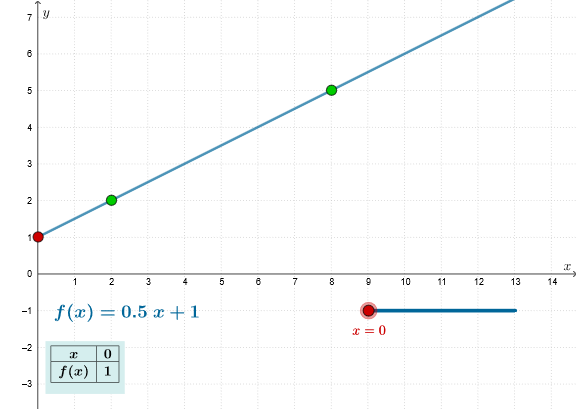
This example demonstrates linear functions and their growth rates. Key mathematical concepts include linear functions and slope. Using GeoGebra commands such as Slope, Sequence, and Line, the example constructs linear function graphs and illustrates their growth rates. Suitable for students at the middle school level and above to learn about linear functions.
GeoGebra Commands & Parameters
Slope(Line[A, B]) → mSequence(FractionText[f(n)], n, 0, Length[xSeq] + 1) → ySeqTextSequence(f(n), n, 0, Length[xSeq] + 1) → ySeq, {1, 1.5, 2, 2.5, 3, 3.5, 4, 4.5, 5, 5.5, 6, 6.5, 7, 7.5, 8, 8.5, 9}Line(A, B) → hSequence((Element[xSeq, k], Element[ySeq, k]), k, 1, n + 1) → ptListTableText({Join[{{"\(x\)"}, Sequence[Element[xSeq, k], k, 1, n + 1]}], Join[{{"f(x)"}, Sequence[Element[ySeqText, k], k, 1, n + 1]}], "c_"}, "c_|h") → text1
AI Drawing Prompt Reference
Draw a graph of a linear function showing the slope m and growth rate of f(x). Include axes, a line, a sequence of points, and text labels. Draw the axes first, then the line, followed by the points and labels, to illustrate the linear growth.
The prompt above was compiled from the original drawing commands and is for reference only.