
Linear Function and Minimum Perimeter of a Triangle
Loading the math board and drawing, please wait…
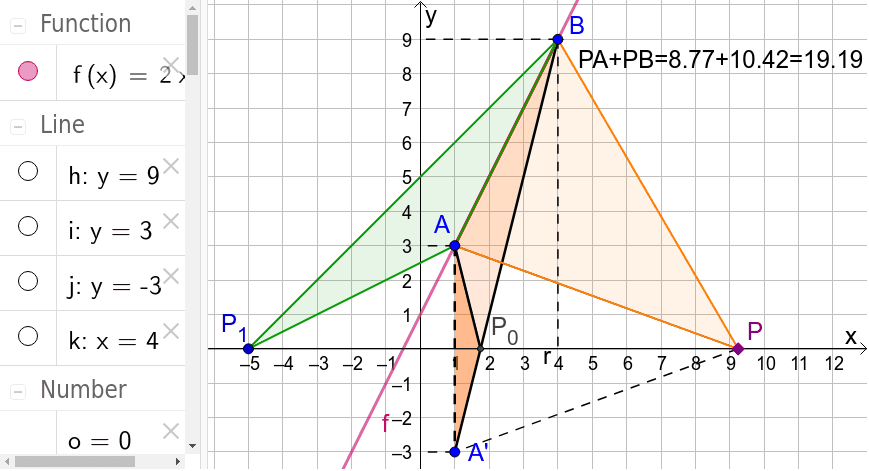
This GeoGebra example demonstrates how to construct a triangle under a linear function constraint and find its minimum perimeter. The core mathematical concepts involve linear functions, reflection transformations, minimization of distance sums, and the idea of extrema from differential calculus. Construction highlights: using commands such as Point, Segment, Mirror, Intersect, OrthogonalLine, Polygon, and Distance, the applet creates objects like function f, points D, C, A, B, P, and the reflected point A', along with perpendicular lines and polygons. By dragging point P_0 or using sliders, learners can observe how the triangle's perimeter changes and identify the minimal configuration. This resource is suitable for high school or early college students studying optimization problems that combine geometry and algebra, and it serves as an intuitive visual aid for teaching derivative-based extremum problems.
GeoGebra Commands & Parameters
Point(xAxis) → DPoint(xAxis) → CSegment(C, D) → rSegment(B, A) → aMirror(A, xAxis) → A'Segment(B, A') → bIntersect(b, xAxis) → P_0Point(r) → PSegment(B, P) → cSegment(P, A') → dSegment(A, A') → eSegment(A, P_0) → gOrthogonalLine(B, yAxis) → hOrthogonalLine(A, yAxis) → iOrthogonalLine(A', yAxis) → jOrthogonalLine(B, xAxis) → kIntersect(h, yAxis) → EIntersect(i, yAxis) → FIntersect(j, yAxis) → GIntersect(k, xAxis) → HSegment(B, E) → lSegment(B, H) → mSegment(A, F) → nSegment(A', G) → pPolygon(B, A', A) → poly1, a_1, b_1, a'Polygon(A, P_0, A') → poly2, a'_1, a_2, p_0Segment(A, P) → qDistance(q, c) → oPolygon(B, A, P) → poly3, p_1, b_2, a_3Point(r) → P_1Polygon(P_1, A, B) → poly4, b_3, p_2, a_4
AI Drawing Prompt Reference
Draw a coordinate plane with a linear function graph. Place two fixed points above the x-axiscars, and reflect one of them across the x-axis. Connect the reflected point to the other fixed point; the intersection of this segment with the x-axis is a key vertex. Mark two points on the x-axis as the base endpoints)Skip. Add a movable point on the base segment, and connect it to the two fixed points to form a dynamic triangle. Also draw perpendicular lines from the fixed points and the reflected point to the axes, and construct several triangles involving the fixed points, the reflected point, and the intersection point to illustrate perimeter minimization.
The prompt above was compiled from the original drawing commands and is for reference only.