
Line Segment and Copying a Line Segment
Loading the math board and drawing, please wait…
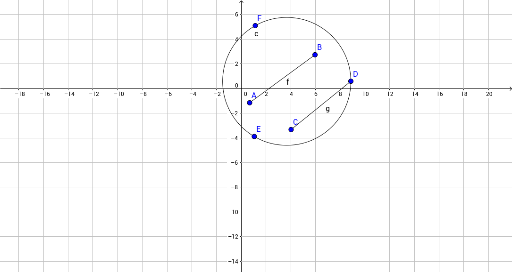
This example demonstrates how to construct a line segment and copy it to another location using compass-and-straightedge techniques in GeoGebra. The core mathematical concepts include the definition of a line segment, equality of lengths, and basic geometric construction. Construction steps: use the Segment command to create segment AB, then draw a circle c centered at A with radius AB, pick a point D on the circle, and connect A to D to form the copied segment; auxiliary objects include B, f, E, F, C, and g. Suitable for middle school geometry lessons, this interactive model helps students understand segment properties and the classic method of transferring lengths, and can be used for dynamic demonstrations of congruent segments.
GeoGebra Commands & Parameters
Segment(A, B) → fCircle(D, E, F) → cSegment(C, D) → g