
Limits of Piecewise-Defined Function #1
Loading the math board and drawing, please wait…
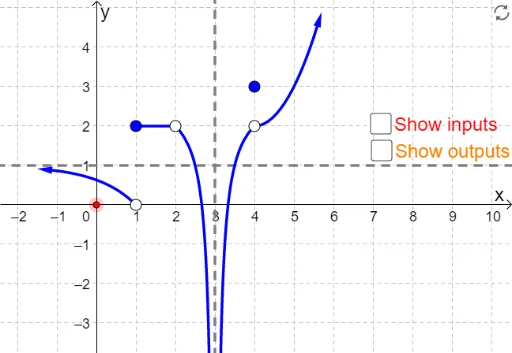
This interactive GeoGebra applet demonstrates left-hand, right-hand, and two-sided limits of a piecewise-defined function by allowing users to drag a red control point along the x-axis. Key mathematical concepts include the formal definition of limits, the relationship between one-sided limits and two-sided limits, and the condition for limit existence. Construction details: Uses Point commands to create draggable input markers, Polygon commands to construct auxiliary visual elements showing function behavior, and Vector commands for related vector representations. Objects include piecewise function f, text labels, and various control parameters. Ideal for high school mathematics courses on limits or introductory college-level analysis, perfect for classroom demonstration to help students build intuitive understanding of limit concepts.
GeoGebra Commands & Parameters
Point(xAxis) → HPolygon(K, L, M, N) → poly1, k, l, m, nVector(H, (x(H), f(x(H)))) → aVector((x(H), f(x(H))), (0, f(x(H)))) → bVector((-1, f(-1)), (-1.5, f(-1.5))) → uVector((5.5, f(5.5)), (5.7, f(5.7))) → v