
Lesson 5: Exploring the Area of a Circle
Loading the math board and drawing, please wait…
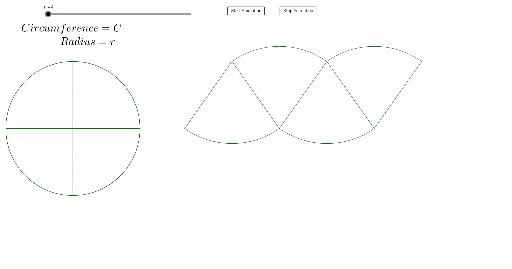
This GeoGebra example dynamically demonstrates the derivation of the area formula for a circle by partitioning it into sectors and rearranging them. The core mathematical concepts include the relationship between a circle's area and π, along with the limit idea underlying the transition from approximate to exact area. The construction uses commands such as Circle, Sequence, Sector, Intersect, Point, and Distance to create the circle, divide it into n sectors, and measure the radius. Interactive buttons (button1, button2) allow users to change the number of sectors n, while text objects display the evolving area calculation. This resource is suitable for middle school to high school students learning the geometric meaning of the circle area formula, and for teachers demonstrating the limit concept in a visual, hands-on way.
GeoGebra Commands & Parameters
Intersect(xAxis, yAxis) → APoint(xAxis) → BCircle(A, B) → cSequence(Rotate[B, (360° * i / n)], i, 1, n) → list1Sequence(Sector[c, Element[list1, i], Element[list1, i + 1]], i, 1, n) → list2Sector(c, B, Element[list1, 1]) → dPoint(xAxis) → CDistance(B, Element[list1, 1]) → eSequence((5 + (e * i), 0), i, 0, n / 2) → list4Sequence((5 + e / 2 + (e * i), 3), i, 0, n / 2) → list3Sequence(Segment[Element[list3, i], Element[list4, i]], i, 1, n) → list5Sequence(Segment[Element[list3, i], Element[list4, i + 1]], i, 1, n) → list6Sequence(CircleArc[Element[list4, i + 1], Element[list3, i + 1], Element[list3, i]], i, 1, n) → list8Sequence(CircleArc[Element[list3, i], Element[list4, i], Element[list4, i + 1]], i, 1, n) → list9
AI Drawing Prompt Reference
Create a dynamic illustration showing the derivation of the circle area formula by partitioning the circle into sectors and rearranging them. Start with a coordinate system where the axes intersect at the center, and draw a circle around this point. Use a slider to control the number of sectors, dividing the circle accordingly. Display the sectors and their rearrangement into a shape that approximates a rectangle, visually demonstrating the area formula. Include dynamic elements like the sectors, the approximating rectangle, and text showing the area calculation to explain the relationship between the circle's area, π, and the concept of limits.
The prompt above was compiled from the original drawing commands and is for reference only.