
Learning Probability Laws by Drawing Cards
Loading the math board and drawing, please wait…
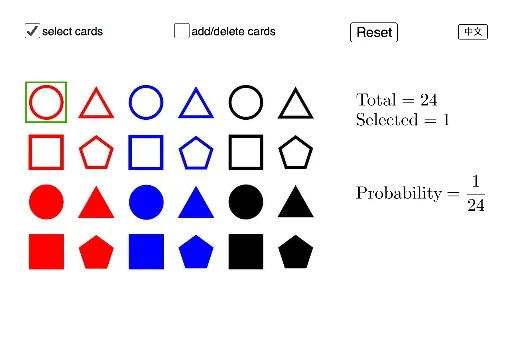
This example demonstrates fundamental probability concepts and calculations by simulating drawing patterned cards. It involves probability, frequency, sample space, events, combinations, ratios, and pie charts. Construction highlights include commands like Polygon, addDelete, select, and sliders. Suitable for middle school and above, ideal for probability & statistics teaching and interactive activities.
GeoGebra Commands & Parameters
Polygon(P1, P1 + (0.8, 0), 4) → poly1, f, g, h, i, A, BPolygon(P4, P4 + (0.8, 0), 4) → poly4, s, t, a, b, G, HPolygon(P5, P5 + (0.8, 0), 4) → poly5, c, d, e, f_1, I, JPolygon(P6, P6 + (0.8, 0), 4) → poly6, g_1, h_1, i_1, j_1, K, LPolygon(P7, P7 + (0.8, 0), 4) → poly7, k_1, l_1, m_1, n_1, M, NPolygon(P8, P8 + (0.8, 0), 4) → poly8, p_1, q_1, r_1, s_1, O, PPolygon(P9, P9 + (0.8, 0), 4) → poly9, t_1, a_1, b_1, c_1, Q, RPolygon(P10, P10 + (0.8, 0), 4) → poly10, d_1, e_1, f_2, g_2, S, TPolygon(P11, P11 + (0.8, 0), 4) → poly11, h_2, i_2, j_2, k_2, U, VPolygon(P12, P12 + (0.8, 0), 4) → poly12, l_2, m_2, n_2, p_2, W, ZPolygon(P13, P13 + (0.8, 0), 4) → poly13, q_2, r_2, s_2, t_2, A_1, B_1Polygon(P14, P14 + (0.8, 0), 4) → poly14, a_2, b_2, c_2, d_2, C_1, D_1Polygon(P15, P15 + (0.8, 0), 4) → poly15, e_2, f_3, g_3, h_3, E_1, F_1Polygon(P16, P16 + (0.8, 0), 4) → poly16, i_3, j_3, k_3, l_3, G_1, H_1Polygon(P17, P17 + (0.8, 0), 4) → poly17, m_3, n_3, p_3, q_3, I_1, J_1Polygon(P18, P18 + (0.8, 0), 4) → poly18, r_3, s_3, t_3, a_3, K_1, L_1Polygon(P19, P19 + (0.8, 0), 4) → poly19, b_3, c_3, d_3, e_3, M_1, N_1Polygon(P20, P20 + (0.8, 0), 4) → poly20, f_4, g_4, h_4, i_4, O_1, P_1Polygon(P21, P21 + (0.8, 0), 4) → poly21, j_4, k_4, l_4, m_4, Q_1, R_1Polygon(P22, P22 + (0.8, 0), 4) → poly22, n_4, p_4, q_4, r_4, S_1, T_1Polygon(P23, P23 + (0.8, 0), 4) → poly23, s_4, t_4, a_4, b_4, U_1, V_1Polygon(P24, P24 + (0.8, 0), 4) → poly24, c_4, d_4, e_4, f_5, W_1, Z_1Polygon(P2, P2 + (0.8, 0), 4) → poly2, j, k, l, p, C, DPolygon(P3, P3 + (0.8, 0), 4) → poly3, q, r, g_5, h_5, E, F
AI Drawing Prompt Reference
Draw a series of rectangles, each with a width of 0.8 and a height of 4. Connect the rectangles with line segments to form a grid-like structure. The positions and connections should follow the given order to illustrate probability and geometric construction concepts.
The prompt above was compiled from the original drawing commands and is for reference only.