
Law of Sines: Dynamic Demonstration and Verification
Loading the math board and drawing, please wait…
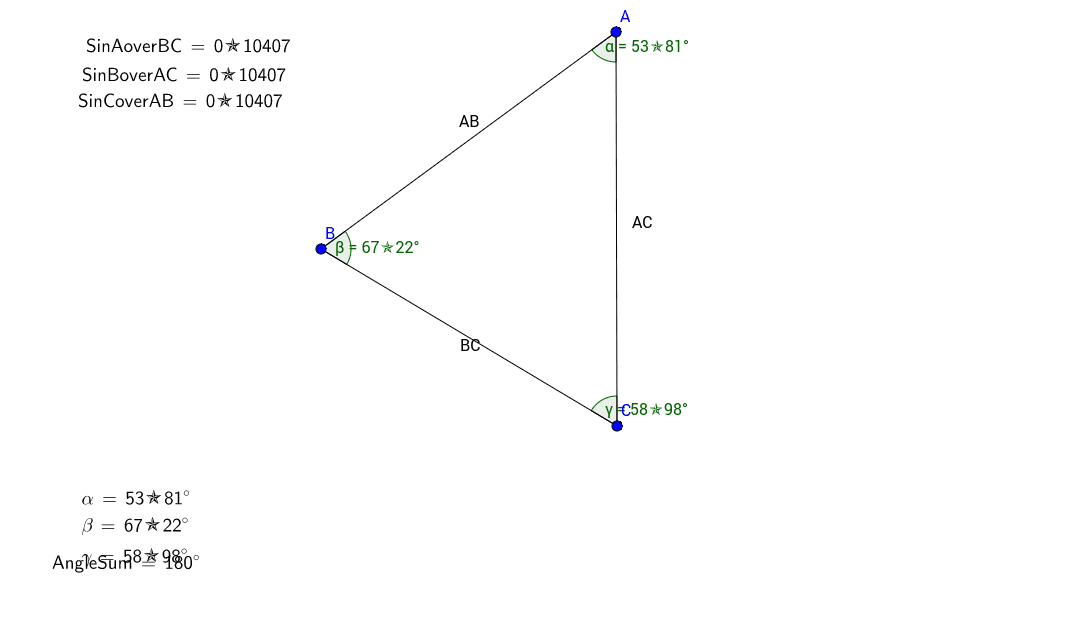
This GeoGebra example provides an interactive visualization of the Law of Sines, demonstrating that in any triangle, the ratio of each side length to the sine of its opposite angle is constant (a/sinA = b/sinB = c/sinC). The core mathematical concepts involve triangle side-angle relationships, the sine function, proportional identities, and the angle sum theorem. Construction details: using the Segment command to create sides AB, BC, and AC; the Angle command to mark interior angles α, β, γ and compute their sum; LaTeX and TableText commands to generate a table that calculates and displays the ratios SinAoverBC, SinBoverAC, and SinCoverAB as text objects (text1–text6), allowing direct comparison of the three equal ratios. This resource is ideal for high school students learning trigonometry and solving triangles, as well as for college preparatory review. It helps learners grasp the universality of the Law of Sines through dynamic manipulation and also demonstrates how to link geometric objects with algebraic computations in GeoGebra.
GeoGebra Commands & Parameters
Segment(A, B) → ABSegment(B, C) → BCSegment(C, A) → ACAngle(B, A, C) → αAngle(A, B, C) → βAngle(A, C, B) → γLaTeX(SinAoverBC, true, true) → text1LaTeX(SinBoverAC, true, true) → text2LaTeX(SinCoverAB, true, true) → text3TableText({{LaTeX[α, true, true]}, {LaTeX[β, true, true]}, {LaTeX[γ, true, true]}}) → text6LaTeX(AngleSum, true, true) → text4