
Law of Sines Demonstration by Ted Sundstrom
Loading the math board and drawing, please wait…
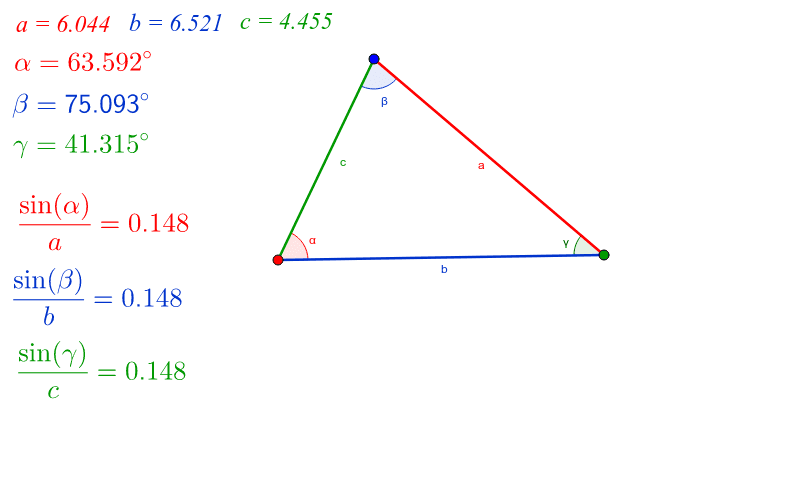
This example demonstrates how moving the three vertices of a triangle dynamically shows the relationship between the lengths of its sides and the sines of its corresponding angles, illustrating the Law of Sines. It involves core mathematical concepts such as the Law of Sines and its application. The construction uses commands like Segment and Angle to draw the triangle and measure angles, with objects like A, B, C, a, b, c, α, β, γ representing sides and angles. It is suitable for high school mathematics education to visually understand the Law of Sines and its practical applications.
GeoGebra Commands & Parameters
Segment(A, B) → cSegment(A, C) → bSegment(B, C) → aAngle(C, A, B) → αAngle(A, B, C) → βAngle(B, C, A) → γ
AI Drawing Prompt Reference
Draw a triangle with three vertices that can be moved dynamically to show the relationship between the lengths of its sides and the sines of its corresponding angles, illustrating the Law of Sines. Start by drawing the three sides of the triangle, then measure the three interior angles. Label the lengths of the sides and the sizes of the angles, and display them to visually demonstrate the proportional relationship between side lengths and sine values of the angles, suitable for high school mathematics education to understand the Law of Sines and its applications.
The prompt above was compiled from the original drawing commands and is for reference only.