
Law of Sines Ambiguous Case Demo
Loading the math board and drawing, please wait…
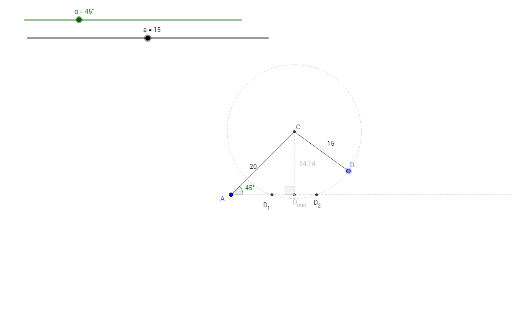
This example demonstrates the possible triangles formed when given two sides and a non-included angle (SSA). It covers the Law of Sines and the ambiguous case, using GeoGebra commands like Ray, Rotate, Angle, Circle, Intersect, Segment, Point, and OrthogonalLine. Ideal for high school trigonometry instruction.
GeoGebra Commands & Parameters
Ray(A, B) → fRotate(B, α, A) → B'Angle(B, A, B') → βRay(A, B') → gCircle(A, 20) → cIntersect(c, g, 1) → CSegment(A, C) → hCircle(C, a) → dPoint(d) → DSegment(C, D) → iOrthogonalLine(C, f) → jIntersect(j, f) → D_{min}Segment(C, D_{min}) → kAngle(C, D_{min}, A) → γIntersect(d, f) → D_1, D_2Segment(A, D_1) → lAngle(C, D_1, A) → δSegment(A, D_2) → mAngle(C, D_2, A) → εAngle(A, C, D) → ζ
AI Drawing Prompt Reference
Draw a triangle demonstration showing two possible triangles given two sides and a non-included angle. Start with a ray, then rotate to form the second ray and angle. Draw a circle from one vertex, intersecting with the second ray to form a triangle. Create another triangle by drawing a circle from the intersection point and intersecting with the first ray. Label all sides, angles, and the two possible vertices for the minimum angle.
The prompt above was compiled from the original drawing commands and is for reference only.