
Law of Cosines Demonstration
Loading the math board and drawing, please wait…
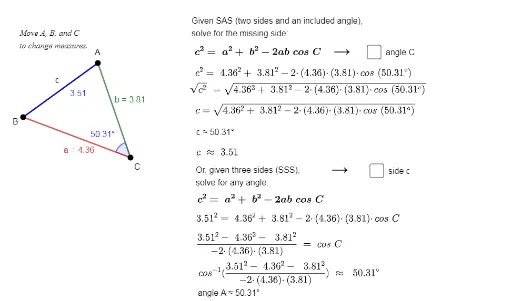
This example demonstrates the Law of Cosines in triangle geometry, showing the relationship between side lengths and angles dynamically. Core math concepts include the Law of Cosines, triangle geometry, and coordinate geometry. It is constructed using GeoGebra commands like Polygon, Angle, and Segment to create a triangle and dynamic elements. Suitable for high school mathematics education to help students visually understand the Law of Cosines and its applications.
GeoGebra Commands & Parameters
Polygon(A, B, C) → t1, c, a, bAngle(B, C, A) → βSegment(B, A) → fSegment(B, A) → hAngle(B, C, A) → α
AI Drawing Prompt Reference
Draw a triangle with three vertices positioned at upper-left, lower-right, and lower-left. Connect the vertices with straight line segments to form a closed triangle, and label all three sides. At the lower-right vertex, draw an arc to indicate an interior angle, and label it with a degree symbol. At the lower-left vertex, draw another arc for a second interior angle, also labeled. Optionally, fill the triangle with a semi-transparent color to highlight its shape. The layout should be clear for observing the relationship between side lengths and angles, suitable for demonstrating the law of cosines.
The prompt above was compiled from the original drawing commands and is for reference only.