
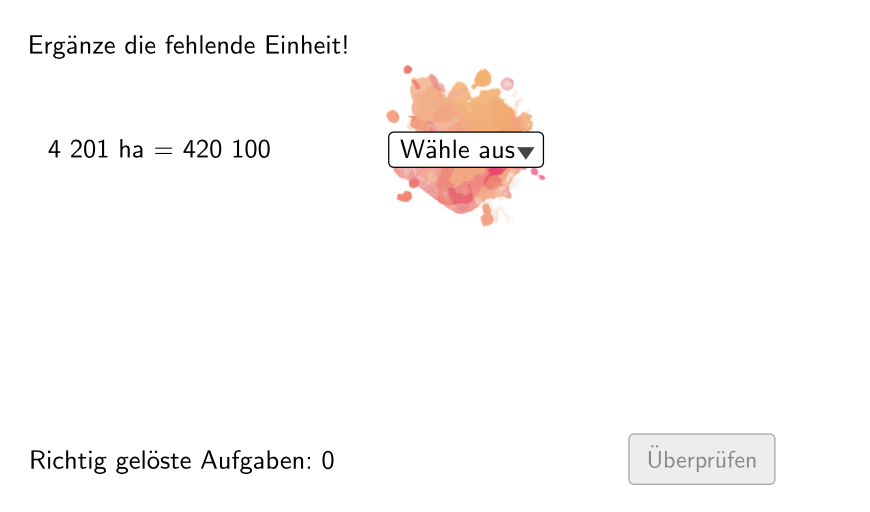
Klecksaufgabe “inkblot” area task: polygon building for area unit conversion
Loading the math board and drawing, please wait…
In collections
Wiederholung: Längen- und Flächenmaße
This GeoGebra lesson demonstrates a “Klecksaufgabe” (inkblot-style) activity where students work with randomly formed polygon regions to practice measuring areas and converting area units. The key math ideas are area measurement and unit conversion (square units), constructing polygon vertices/ corners, and dynamically combining geometry with controlled randomness. Construction highlights include using Join and Polygon to form the polygonal area, Corner/vertex-style elements to define points, Shuffle together with If to randomize point order and apply conditional logic, and IndexOf, Append, Remove, and Element to select, update, and maintain the underlying point lists for dynamic rearrangement. Textfield and NumberSeperation are used to display the computed measurement information. Suitable for grades 5–6 as an interactive practice on area units and basic geometric measurement.
GeoGebra Commands & Parameters
Join(Sequence[Shuffle[{1, 2, 3, 4, 5, 6}], i, 1, 20]) → ListeBeispielCountElement(ListeBeispielCount, Mod[questionCount, 100]) → BeispielCountJoin(Sequence[Shuffle[{true, false}], i, 1, 50]) → ListeWWGroßAufKleinElement(ListeWWGroßAufKlein, Mod[questionCount, 100]) → großAufKleinIf(allowDecimalNumbers, Element[If[großAufKlein, ListeKommaGroßAufKlein, ListeKommaKleinAufGroß], BeispielCount], Element[If[großAufKlein, ListeGroßAufKlein, ListeKleinAufGroß], BeispielCount]) → BeispielElement(Beispiel, 2) → einheit2IndexOf(SelectedElement[LL], LL) → EinheitGewähltShuffle(Sequence[Random[111, 9999], i, 1, 100]) → randomNosForX, {4688, 4201, 4177, 6715, 8901, 7902, 5887, 855, 5789, 2089, 903, 159, 9080, 4730, 9040, 8596, 8748, 5941, 7322, 3190, 1147, 3113, 5312, 6660, 517, 4213, 5255, 5761, 9699, 9077, 2038, 5443, 250, 7630, 1440, 649, 7580, 7724, 7432, 6430, 4366, 7697, 1351, 2354, 8836, 2124, 839, 3919, 3150, 4427, 1404, 7115, 7189, 2649, 4009, 1967, 3253, 5362, 3099, 430, 2440, 5556, 9417, 6578, 9858, 7670, 8216, 9734, 3179, 8862, 972, 2595, 6841, 8346, 6907, 2469, 7094, 4221, 7576, 943, 6542, 459, 2529, 4476, 2256, 3013, 4484, 1278, 7091, 8644, 3083, 8877, 6593, 1630, 5832, 2713, 7239, 757, 2489, 4239}Append(true, Sequence[If[randomNosForX(i) ≟ randomNosForX(i - 1), false, true], i, 2, 100]) → stayXRemove(Sequence[If[stayX(i), randomNosForX(i), 0], i, 1, 100], Sequence[0, i, 1, 100]) → randomNosForXwithoutRepeatElement(randomNosForXwithoutRepeat, Mod[questionCount, Length[randomNosForXwithoutRepeat]] + 1) → numXwithoutRepeatElement(Beispiel, 1) → einheit1If(großAufKlein, Element[Beispiel, 4], 1 / Element[Beispiel, 4]) → faktorCorrectShuffle(Sequence[Random[1, 3], i, 1, 100]) → ListeFaktoren, {1, 1, 1, 3, 1, 1, 1, 2, 2, 1, 3, 2, 2, 1, 3, 1, 3, 3, 2, 1, 3, 3, 2, 3, 2, 2, 1, 1, 1, 2, 1, 1, 2, 3, 3, 1, 1, 3, 1, 2, 3, 2, 1, 2, 2, 3, 3, 3, 1, 2, 2, 1, 1, 1, 1, 2, 1, 1, 1, 1, 3, 3, 3, 2, 1, 3, 1, 2, 1, 1, 2, 3, 1, 1, 2, 3, 1, 3, 2, 1, 1, 2, 2, 1, 2, 2, 1, 2, 3, 2, 1, 3, 3, 1, 1, 2, 1, 1, 2, 3}Element(ListeFaktoren, Mod[questionCount, 100]) → positionFaktor0Element(Element[Beispiel, 3], positionFaktor0) → faktor0NumberSeperation(num) → NumSeperatedNumberSeperation(numCorrect) → TextNumCorrectTextfield(aInput) → InputBox1Textfield(bInput) → InputBox2Polygon(PtopLeftCornerFeedback, PtopRightCornerFeedback, PbottomRightCornerFeedback, PbottomLeftCornerFeedback) → rectangleCorrect, ptopleftcornerfeedback, ptoprightcornerfeedback, pbottomrightcornerfeedback, pbottomleftcornerfeedbackElement(randomNosForX, Mod[questionCount, 100] + 1) → numXCorner(Text2, 3) → ACorner(Text2, 2) → D
AI Drawing Prompt Reference
Create a randomly generated polygon to demonstrate area measurement and unit conversion practice. The polygon consists of four points selected randomly but following specific rules, with their order shuffled. Display a conversion factor between two units and allow users to input measurements. Highlight the polygonal area with distinct colors and line styles, and label key points. The design should emphasize the dynamic and randomized nature of geometric construction, suitable for 5th-6th grade students.
The prompt above was compiled from the original drawing commands and is for reference only.