
Kite Properties Exploration
Loading the math board and drawing, please wait…
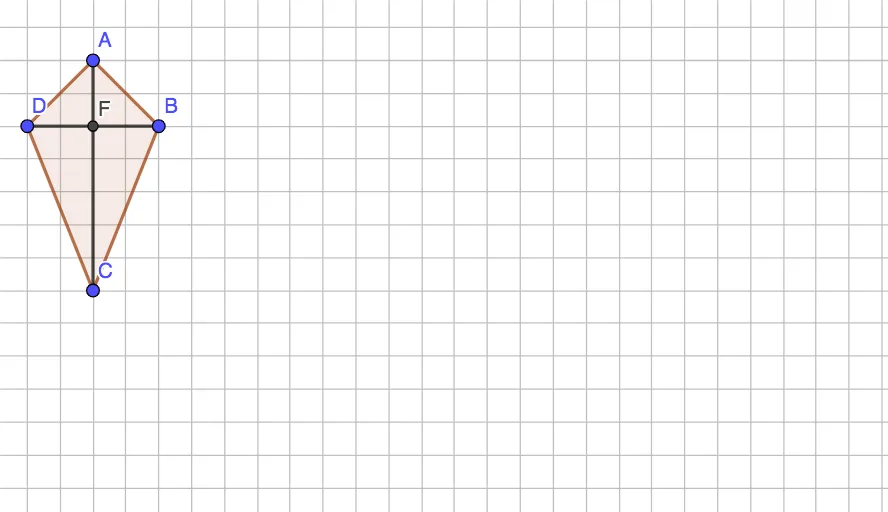
This GeoGebra example dynamically demonstrates the geometric properties of a kite, a quadrilateral with two pairs of adjacent equal sides. The core mathematical concepts include axial symmetry, perpendicular diagonals, one diagonal bisecting the other, and congruent triangles formed by the diagonals. Construction highlights: the Polygon command creates quadrilateral ABCD, the Intersect command finds the intersection point E of the diagonals, and the Segment command connects diagonals and key segments, with auxiliary point F to observe symmetry. Suitable for middle and high school students learning quadrilateral properties, axial symmetry, and congruent triangles, as well as for geometric construction practice and dynamic exploration.
GeoGebra Commands & Parameters
Polygon(A, B, C, D) → q1, a, b, c, dIntersect(c, a) → ESegment(A, C) → fSegment(D, B) → gIntersect(f, g) → F
AI Drawing Prompt Reference
Draw a quadrilateral with two pairs of adjacent equal sides, forming a kite shape. Start by plotting four vertices and connecting them into a closed figure. Then draw the two diagonals, which intersect at a point. Next, draw a segment from one vertex to the intersection point, and another segment from the opposite vertex to the same point, creating several triangles with the diagonals. Finally, add an auxiliary point to observe symmetry. The figure should clearly show perpendicular diagonals, one diagonal bisecting the other, and congruent triangles formed by the diagonals.
The prompt above was compiled from the original drawing commands and is for reference only.