
Kite Construction and Measurement Analysis
Loading the math board and drawing, please wait…
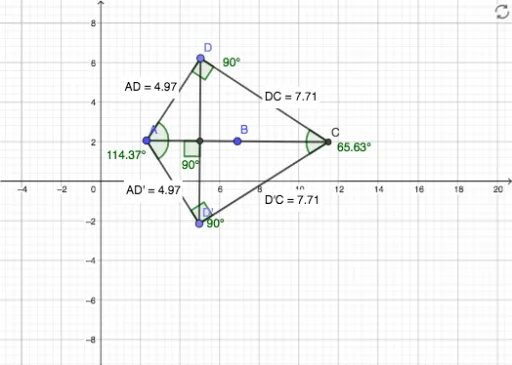
① This example demonstrates how to construct a kite quadrilateral in GeoGebra and dynamically display its side lengths, angles, and symmetry properties. ② Core mathematical concepts include the definition of a kite (two pairs of adjacent equal sides), axial symmetry, angle relationships, and distance measurement, involving geometric construction and metric analysis. ③ Construction highlights: from the summary, commands such as Ray, Circle, Intersect, Point, Mirror, Segment, Angle, and Distance are used, creating objects A, B, f, c, C, D, D', g, h, i, j, k, l, E, and multiple angles α-θ along with distance texts (e.g., distanceAD', distanceD'C, distanceD'D, distanceAD, distanceDC). The mirror command and circle intersections ensure symmetry. ④ Suitable for middle school geometry teaching, this example helps students intuitively understand kite properties, symmetry transformations, and metric relationships, and serves as an introductory dynamic geometry exploration.
GeoGebra Commands & Parameters
Ray(A, B) → fCircle(B, A) → cIntersect(c, f, 2) → CPoint(c) → DMirror(D, f) → D'Segment(A, D) → gSegment(A, D') → hSegment(C, D') → iSegment(C, D) → jSegment(D', D) → kSegment(A, C) → lIntersect(k, l) → EAngle(D, E, A) → αAngle(A, E, D') → βAngle(D', E, C) → γAngle(C, E, D) → δAngle(D', A, D) → εAngle(C, D', A) → ζAngle(D, C, D') → ηAngle(A, D, C) → θDistance(A, D') → distanceAD'Distance(D', C) → distanceD'CDistance(D', D) → distanceD'DDistance(A, D) → distanceADDistance(D, C) → distanceDC
AI Drawing Prompt Reference
Draw a kite ABCD with AD and BC as adjacent equal sides. Start by drawing a line segment AB, then draw a circle centered at B that intersects the extension of AB at point C. Next, draw a circle centered at C that intersects the extension of BC at point D. Use the mirror tool to reflect D over AB to get point D', then connect AD, AD', CD', CD, D'D, and AC, with their intersection point E as the intersection of the diagonals. Measure and display the lengths of all sides and diagonals, as well as the angles.
The prompt above was compiled from the original drawing commands and is for reference only.