
Kite by ashleigh.singh
Loading the math board and drawing, please wait…
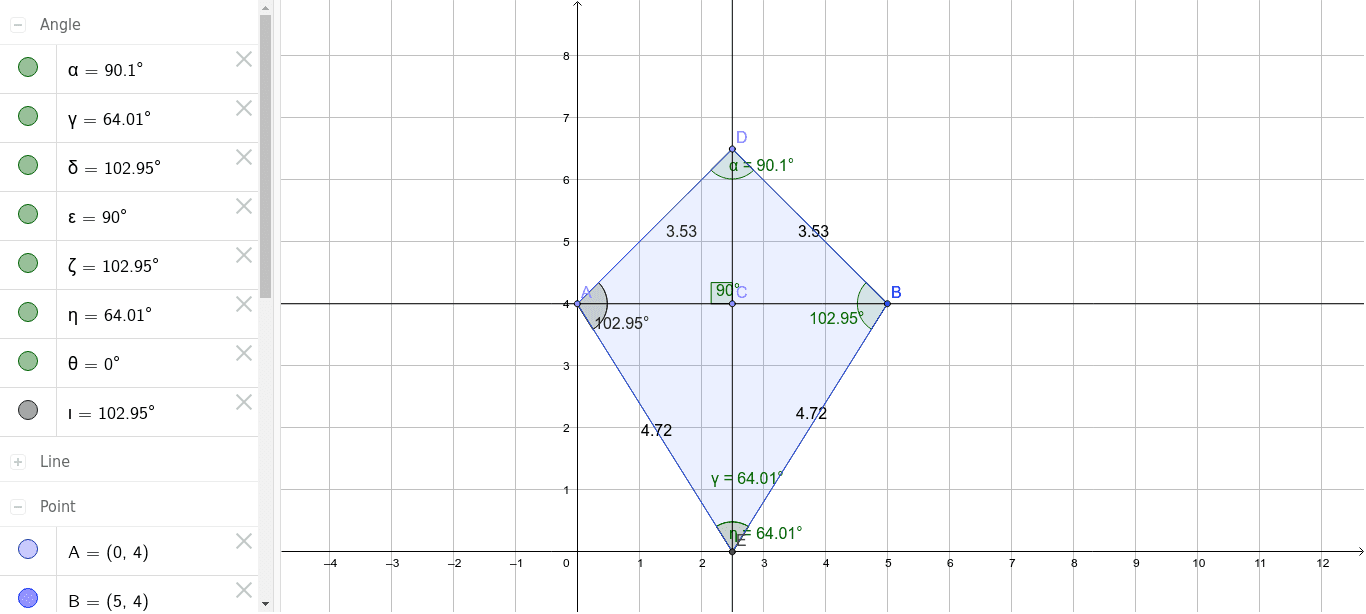
This example demonstrates the construction and properties of a kite, a special type of quadrilateral with two pairs of adjacent equal sides. Using GeoGebra commands such as Point, Line, OrthogonalLine, Segment, Intersect, and Polygon, a kite can be constructed and its angles and area properties explored. Suitable for middle school and above students to learn about geometric transformations and polygon properties.
GeoGebra Commands & Parameters
Point(yAxis) → ALine(A, B) → aPoint(a) → COrthogonalLine(C, a) → bPoint(b) → DSegment(A, D) → cSegment(D, B) → dIntersect(b, xAxis) → ESegment(A, E) → eSegment(B, E) → fPolygon(D, A, E, B) → poly1, d_1, a_1, e_1, b_1Angle(A, D, B) → αAngle(B, E, A) → γAngle(E, A, D) → δAngle(D, C, A) → εAngle(D, B, E) → ζAngle(B, E, A) → ηAngle(E, A, E) → θAngle(E, A, D) → ι
AI Drawing Prompt Reference
Draw a kite ABCD with AD and BC as adjacent equal sides. Start by placing point A on the y-axis, then draw a horizontal line a through A, and take point C on line a. Line b, perpendicular to a, intersects the x-axis at point E, and you take point D on line b. Draw line segments AD and DB, then connect points D, A, E, and B to form quadrilateral ABED. Finally, measure and observe the angles.
The prompt above was compiled from the original drawing commands and is for reference only.