
Isosceles Triangle Construction Task
Loading the math board and drawing, please wait…
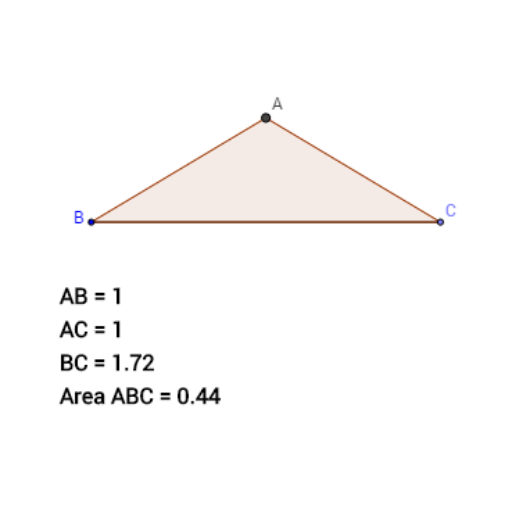
This example demonstrates how to construct an isosceles triangle using geometric construction tools in GeoGebra. The core mathematical concepts include the definition of an isosceles triangle (two equal sides) and the property of the perpendicular bisector (any point on it is equidistant from the endpoints of the segment). The construction steps involve using GeoGebra commands such as Line, Point, and Segment to create the base line and points; LineBisector to construct the perpendicular bisector of the base; Circle to draw a circle centered at one endpoint with radius equal to the base length; Intersect to find the intersection point of the perpendicular bisector and the circle, which serves as the third vertex; and finally Polygon to form the triangle. This activity is suitable for middle school geometry lessons, helping students understand the construction of isosceles triangles and reinforcing skills in using perpendicular bisectors, circles, and intersection points.
GeoGebra Commands & Parameters
Line(A_1, xAxis) → fPoint(f) → CSegment(A_1, C) → gPoint(g) → BSegment(B, C) → hLineBisector(h) → iCircle(B, 1) → cIntersect(c, i) → D, APolygon(A, B, C) → poly1, b, e, c_1
AI Drawing Prompt Reference
Draw an isosceles triangle by first creating a horizontal line segment as the base, then drawing a perpendicular line from the midpoint of the base, followed by drawing a circle with one endpoint of the base as the center and the base length as the radius. The intersection of the circle and the perpendicular line is the third vertex. Finally, connect the three points to form the triangle.
The prompt above was compiled from the original drawing commands and is for reference only.