
Isosceles Trapezoid Tessellation
Loading the math board and drawing, please wait…
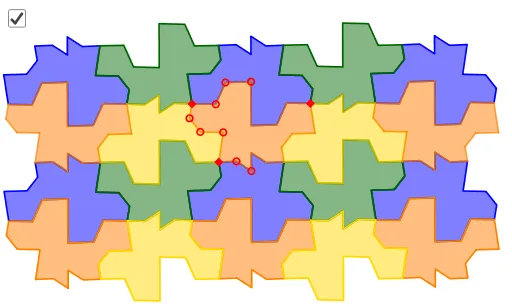
This example demonstrates tessellation by altering an isosceles trapezoid, involving concepts like reflection, rotation, translation, and coordinate geometry. It uses commands such as Midpoint, Mirror, Vector, Rotate, Translate, and Polygon to construct the pattern, making it suitable for high school students to explore geometric transformations and tessellations.
GeoGebra Commands & Parameters
Midpoint(A, B) → GMirror(C, LineBisector[Segment[A, B]]) → C'Vector(Midpoint[A, C], Midpoint[B, C']) → uPointIn(Polygon[A + v, A - v, G - v, G + v]) → DPointIn(Polygon[D + v, D - v, G - v, G + v]) → EPointIn(Polygon[E + v, E - v, G - v, G + v]) → FRotate(D, 180°, G) → D'Rotate(E, 180°, G) → E'Rotate(F, 180°, G) → F'PointIn(Polygon[A + (0.5 * u), A - (0.5 * u), C - (0.5 * u), C + (0.5 * u)]) → HPointIn(Polygon[H + (0.5 * u), H - (0.5 * u), C - (0.5 * u), C + (0.5 * u)]) → IPointIn(Polygon[I + (0.5 * u), I - (0.5 * u), C - (0.5 * u), C + (0.5 * u)]) → JMidpoint(A, C) → KLine(K, K + u) → fTranslate(Mirror[H, f], u) → LTranslate(Mirror[I, f], u) → MTranslate(Mirror[J, f], u) → NMidpoint(C, C') → OPointIn(Polygon[C + v, C - v, O - v, O + v]) → PPointIn(Polygon[P + v, P - v, O - v, O + v]) → QRotate(P, 180°, O) → P'Rotate(Q, 180°, O) → Q'Polygon(C, P, D', E', F', F, E, D, A, H, I, J, Q, Q', P', C', L, M, N, B) → poly1, c, b, d', e', f', f_1, e, d, a, h, i, p, j, q, q', p', c', l, m, nTranslate(C, Vector[(2 * u)]) → C'_1Translate(P, Vector[(2 * u)]) → P'_1Translate(Q, Vector[(2 * u)]) → Q'_1Translate(Q', Vector[(2 * u)]) → Q''Translate(P', Vector[(2 * u)]) → P''Translate(C', Vector[(2 * u)]) → C''Translate(L, Vector[(2 * u)]) → L'Translate(M, Vector[(2 * u)]) → M'Translate(N, Vector[(2 * u)]) → N'Translate(B, Vector[(2 * u)]) → B'Translate(D', Vector[(2 * u)]) → D''Translate(E', Vector[(2 * u)]) → E''Translate(F', Vector[(2 * u)]) → F''Translate(F, Vector[(2 * u)]) → F'_1Translate(E, Vector[(2 * u)]) → E'_1Translate(D, Vector[(2 * u)]) → D'_1Translate(A, Vector[(2 * u)]) → A'Translate(H, Vector[(2 * u)]) → H'Translate(I, Vector[(2 * u)]) → I'Translate(J, Vector[(2 * u)]) → J'Polygon(C'_1, P'_1, D'', E'', F'', F'_1, E'_1, D'_1, A', H', I', J', Q'_1, Q'', P'', C'', L', M', N', B') → poly1', c'_1, b', d'', e'', f'', f'_1, e'_1, d'_1, a', h', i', p'_1, j', q'_1, q'', p'', c'', l', m', n'Translate(C, Vector[(-2 * u)]) → C'_2Translate(P, Vector[(-2 * u)]) → P'_2Translate(Q, Vector[(-2 * u)]) → Q'_2Translate(Q', Vector[(-2 * u)]) → Q''_1Translate(P', Vector[(-2 * u)]) → P''_1Translate(C', Vector[(-2 * u)]) → C''_1Translate(L, Vector[(-2 * u)]) → L'_1Translate(M, Vector[(-2 * u)]) → M'_1Translate(N, Vector[(-2 * u)]) → N'_1Translate(B, Vector[(-2 * u)]) → B'_1Translate(D', Vector[(-2 * u)]) → D''_1Translate(E', Vector[(-2 * u)]) → E''_1Translate(F', Vector[(-2 * u)]) → F''_1Translate(F, Vector[(-2 * u)]) → F'_2Translate(E, Vector[(-2 * u)]) → E'_2Translate(D, Vector[(-2 * u)]) → D'_2Translate(A, Vector[(-2 * u)]) → A'_1Translate(H, Vector[(-2 * u)]) → H'_1Translate(I, Vector[(-2 * u)]) → I'_1Translate(J, Vector[(-2 * u)]) → J'_1Polygon(C'_2, P'_2, D''_1, E''_1, F''_1, F'_2, E'_2, D'_2, A'_1, H'_1, I'_1, J'_1, Q'_2, Q''_1, P''_1, C''_1, L'_1, M'_1, N'_1, B'_1) → poly1'_1, c'_2, b'_1, d''_1, e''_1, f''_1, f'_2, e'_2, d'_2, a'_1, h'_1, i'_1, p'_2, j'_1, q'_2, q''_1, p''_1, c''_1, l'_1, m'_1, n'_1Translate(Polygon[Mirror[C, f], Mirror[P, f], Mirror[Q, f], Mirror[Q', f], Mirror[P', f], Mirror[C', f], Mirror[L, f], Mirror[M, f], Mirror[N, f], Mirror[B, f], Mirror[D', f], Mirror[E', f], Mirror[F', f], Mirror[F, f], Mirror[E, f], Mirror[D, f], Mirror[A, f], Mirror[H, f], Mirror[I, f], Mirror[J, f]], Vector[(-u)]) → poly2Translate(Polygon[Mirror[C, f], Mirror[P, f], Mirror[Q, f], Mirror[Q', f], Mirror[P', f], Mirror[C', f], Mirror[L, f], Mirror[M, f], Mirror[N, f], Mirror[B, f], Mirror[D', f], Mirror[E', f], Mirror[F', f], Mirror[F, f], Mirror[E, f], Mirror[D, f], Mirror[A, f], Mirror[H, f], Mirror[I, f], Mirror[J, f]], u) → poly3Rotate({poly1'_1, poly1, poly1'}, 180°, G) → l1Rotate({poly1'_1, poly1, poly1'}, 180°, O) → l2Rotate(G, 180°, O) → G'Rotate(l2, 180°, G') → l2'Rotate({poly2, poly3}, 180°, G) → l3Rotate({poly2, poly3}, 180°, O) → l4Rotate(l4, 180°, G') → l4'
AI Drawing Prompt Reference
Create a tessellation pattern using an isosceles trapezoid, starting by finding the midpoints of the legs and connecting them, then reflecting over the base, followed by rotations and translations using vectors, repeatedly applying these transformations to form a continuous geometric design that illustrates reflection, rotation, translation, and coordinate geometry.
The prompt above was compiled from the original drawing commands and is for reference only.