
Isosceles Trapezoid: Construction and Properties
Loading the math board and drawing, please wait…
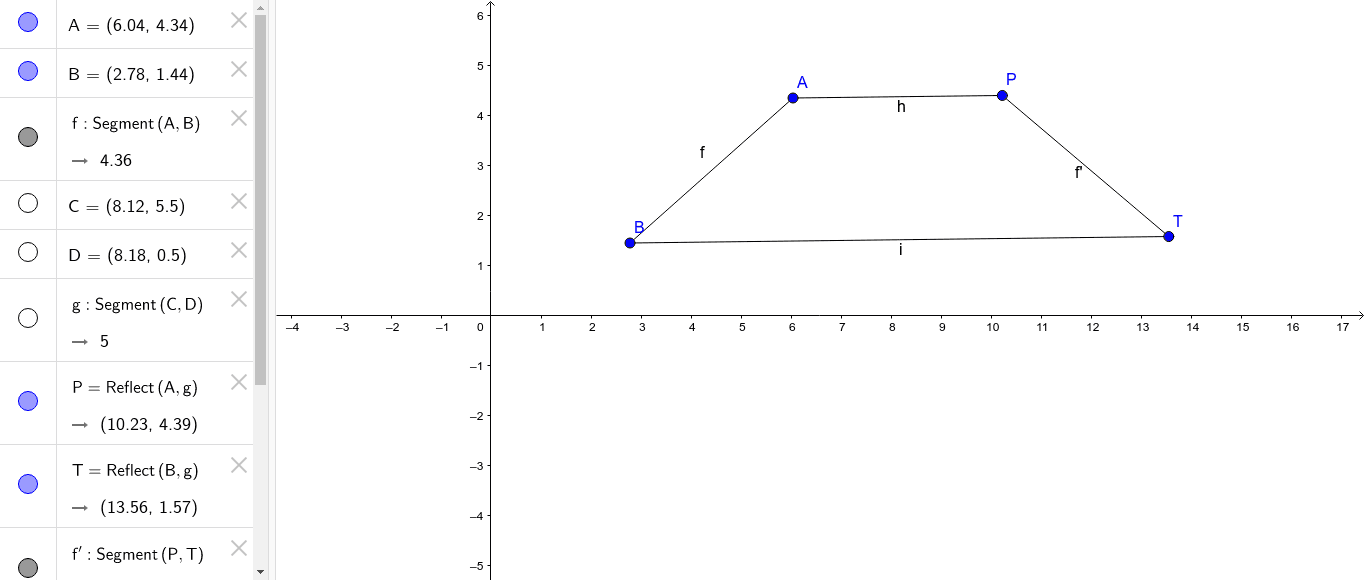
① This GeoGebra example dynamically demonstrates the construction of an isosceles trapezoid, visually highlighting its equal legs, equal base angles, and axis of symmetry. ② Core mathematical concepts include the definition of an isosceles trapezoid, axial symmetry, midpoints, perpendicular bisectors, and geometric transformations via reflection (mirror). ③ Construction details: Based on the summary, the Segment command is used to create the sides of the trapezoid, and the Mirror command generates symmetric parts, involving objects A, B, C, D, P, T, segments f, g, h, i, j, and function f'. The mirror operation ensures the two legs are equal in length, forming an isosceles trapezoid. ④ Suitable for middle school geometry or introductory high school analytic geometry, this example serves as a classroom demonstration for verifying properties of isosceles trapezoids, exploring symmetry, and as a practice exercise for geometric construction, helping students understand the connection between transformations and geometric properties.
GeoGebra Commands & Parameters
Segment(A, B) → fSegment(C, D) → gMirror(A, g) → PMirror(B, g) → TSegment(P, T) → f'Segment(A, P) → hSegment(B, T) → iSegment(C, D) → j
AI Drawing Prompt Reference
Draw an isosceles trapezoid, highlighting its equal legs and base angles, and showing the axis of symmetry. Start by drawing two parallel line segments as the bases. Find the midpoint of one base, use the other base as the axis of symmetry, and reflect one endpoint of the first base to the other side. Connect this reflected point to the other endpoint of the first base to form the trapezoid. Label the legs, base angles, and symmetry axis, and explain their relationships.
The prompt above was compiled from the original drawing commands and is for reference only.