
Islamic Star Pattern Generation via Rotation and Polygon Construction
Loading the math board and drawing, please wait…
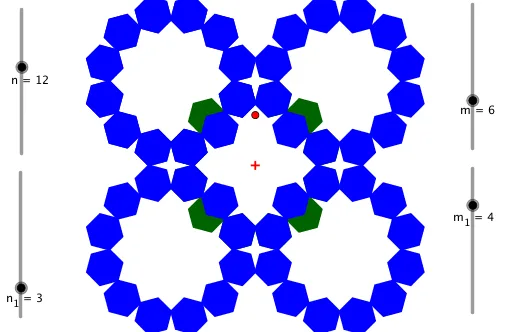
This example demonstrates how to generate Islamic-style star tiling patterns using geometric operations such as rotation, polygon construction, and sequences. The core mathematical concepts involve rotational symmetry, interior angles of regular polygons, intersections of rays, and repeated construction driven by sequences. Key construction steps: define base points A and B with Point, use Rotate to create rotated point B', employ Ray and Intersect to determine critical intersection points, build a base polygon poly1 with Polygon, and then use Sequence and Centroid to generate multiple layered star elements (objects like g, h, i, j, k, l). This example is suitable for upper secondary or early university students to explore geometric transformations, symmetry, and parametric design, and serves as a creative integration of mathematics and art.
GeoGebra Commands & Parameters
Point(Ray[A, A + (0, 1)]) → BRotate(B, (180°) / n, A) → B'Ray(B, B + (0, 1)) → fIntersect(f, Rotate[Ray[Rotate[B, (180°) / n, A], Rotate[B + (0, 1), (180°) / n, A]], ((-(90°)) * (m - 2) / m), B']) → DPolygon(B', D, m) → poly1, g, i_1, l_1, m_2, C, E, F, G, O, P, S, h, T, W, Z, i, j, k, l, d, e, h_1Sequence(Rotate[poly1, (i * (360°) / n), A], i, 0, n - 1) → l1Centroid(poly1) → HRotate(l1, (m_1 / m * 360°), H) → l1'Sequence(Rotate[l1', ((i * n_1) * (360°) / n), A], i, 0, u) → l2
AI Drawing Prompt Reference
Start with a central point and a point directly above it. Rotate the upper point around the center by an angle determined by a parameter to get a second point. From this second point, draw a vertical ray upward, then rotate this ray around the second point by a specific angle and intersect it with another rotated ray to find a key intersection. Using the second point, the intersection, and several other vertices, construct a regular polygon as the base tile. Then rotate this base polygon around the center in equal angular steps to create a full ring of symmetric star shapes. Next, find the centroid of the base polygon, rotate the entire ring around this centroid by a proportional angle, and finally rotate the whole pattern around the original center in another set of angular steps to produce a multi-layered Islamic star tiling pattern.
The prompt above was compiled from the original drawing commands and is for reference only.