
Islamic Star Pattern Exploration
Loading the math board and drawing, please wait…
In collections
Regular Polygons
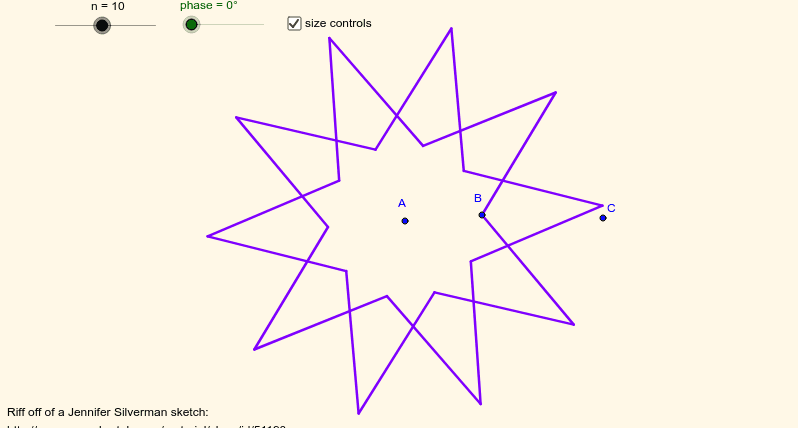
This example demonstrates how to construct an Islamic star pattern through a double cycle of points. It involves core mathematical concepts such as geometric construction, rotational symmetry, and point set sequences. Key GeoGebra commands and objects used include Circle, Ray, Rotate, Sequence, Intersect, Union, with objects like phase, B, A, c, C, d, a, n, D, Inner, InnerPts, E, E', OuterPts, list1, list2, star, b. Suitable for high school and above students exploring geometric constructions and symmetry.
GeoGebra Commands & Parameters
Circle(A, B) → cCircle(A, C) → dRay(A, B) → aRotate(B, phase, A) → DSequence(i * 360 * ° / n, i, 1, n) → InnerSequence(Rotate[D, Element[Inner, i], A], i, 1, n) → InnerPtsIntersect(d, a, 1) → ERotate(E, 360 * ° / (2 * n), A) → E'Sequence(Rotate[E, Element[Inner, i] + 360 * ° / n, A], i, 1, n) → OuterPtsSequence(Segment[Element[InnerPts, i], Element[OuterPts, i]], i, 1, n) → list1Sequence(Segment[Element[InnerPts, If[i + 2 > n, i + 2 - n, i + 2]], Element[OuterPts, i]], i, 1, n) → list2Union(list1, list2) → star
AI Drawing Prompt Reference
Draw an Islamic star pattern constructed through a double cycle of points, demonstrating geometric construction, rotational symmetry, and point set sequences. Begin by drawing two concentric circles, then create a ray from a point on one circle. Rotate this point around the center at specific angles to generate a series of points. Use rotations and intersections to create inner and outer point sets, and finally connect these points to form the star pattern.
The prompt above was compiled from the original drawing commands and is for reference only.