
Islamic Kite Pattern
Loading the math board and drawing, please wait…
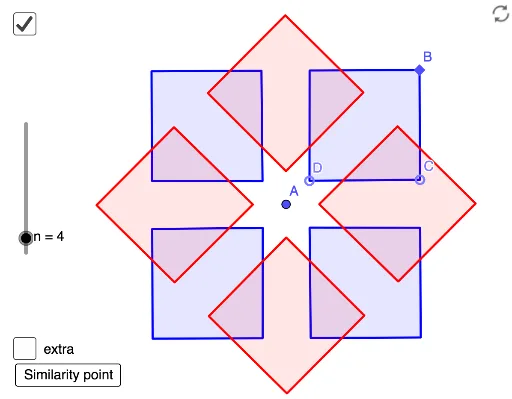
This GeoGebra example demonstrates an Islamic kite pattern. It involves symmetry and geometric transformations. Using commands such as Ray, Point, Mirror, Sequence, and Intersect, a beautiful pattern can be constructed. Suitable for middle school and above students to learn about symmetry and geometric transformations.
GeoGebra Commands & Parameters
Ray(A, B) → fPoint(Ray[B, Rotate[A, α / 2, B]]) → CPoint(Segment[A, B]) → DMirror(C, f) → C'Sequence(Polygon[Rotate[D, (i * (360°) / n), A], Rotate[C, (i * (360°) / n), A], Rotate[B, (i * (360°) / n), A], Rotate[C', (i * (360°) / n), A]], i, 0, n - 1) → l1Sequence(Polygon[Rotate[D, (180°) / n + (i * (360°) / n), A], Rotate[C, (180°) / n + (i * (360°) / n), A], Rotate[B, (180°) / n + (i * (360°) / n), A], Rotate[C', (180°) / n + (i * (360°) / n), A]], i, 0, n - 1) → l2Intersect(Line[A, B], Ray[C, Rotate[B, γ, C]]) → D'Sequence(Rotate[Translate[l1, Vector[(2 * Vector[A, B])]], ((If[n < 8, 1, 2] * i) * (360°) / n), A], i, 1, If[n < 8, n, floor(n / 2)]) → l3Sequence(Rotate[Translate[l2, Vector[(2 * Vector[A, B])]], ((If[n < 8, 1, 2] * i) * (360°) / n), A], i, 1, If[n < 8, n, floor(n / 2)]) → l4
AI Drawing Prompt Reference
Draw an Islamic kite pattern featuring symmetry and geometric transformations. Start by creating a ray and two points, then use rotation and reflection to form multiple kite-shaped polygons. Finally, translate and rotate these polygons to assemble a complex decorative pattern that highlights geometric symmetry.
The prompt above was compiled from the original drawing commands and is for reference only.